
What Are Motion Graphics? Complete Guide for Businesses
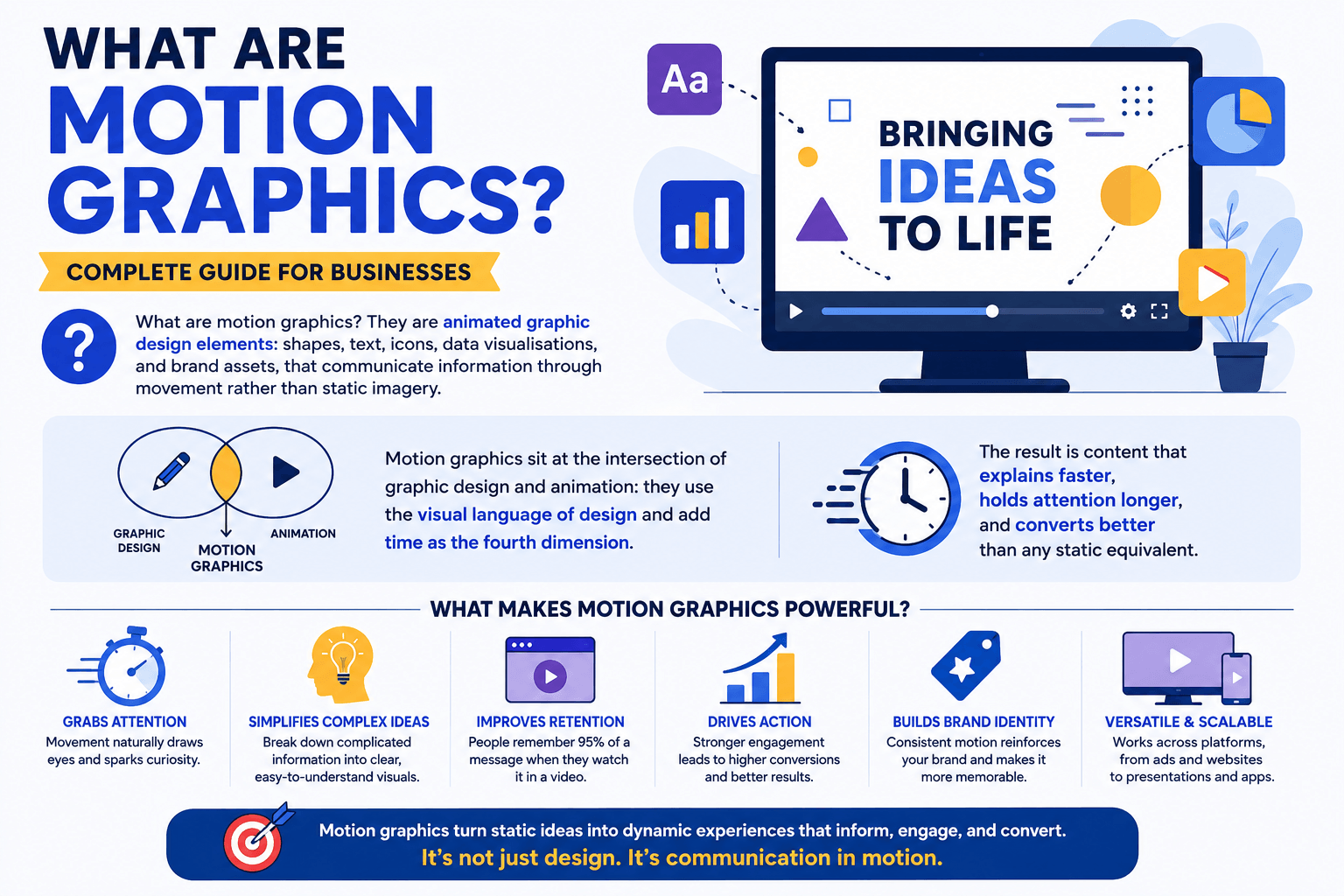
What are motion graphics? They are animated graphic design elements: shapes, text, icons, data visualisations, and brand assets, that communicate information through movement rather than static imagery. Motion graphics sit at the intersection of graphic design and animation: they use the visual language of design and add time as the fourth dimension. The result is content that explains faster, holds attention longer, and converts better than any static equivalent.
This guide answers what are motion graphics in full: the definition, all eight business types, which type fits which goal, where they perform best by platform, how they are produced, and the five mistakes businesses make most often. If you are evaluating motion graphics for your marketing, your product, or your brand, everything you need to make an informed decision is here.
What Are Motion Graphics? The Complete Definition
Motion graphics are one of the most misunderstood terms in digital marketing. Here is the precise definition and why it matters for business decisions.
What are motion graphics? Motion graphics are animated graphic design elements (including shapes, typography, icons, data visualisations, and brand assets) that use movement to communicate information, build brand identity, and drive audience action.
The key distinction: motion graphics communicate through designed graphic elements in motion. Traditional animation communicates through characters in a narrative. In practice the two overlap, but the intent is different: what are motion graphics at their core is graphic design with the dimension of time added. They inform, persuade, and reinforce brand identity through visual movement rather than through character-driven storytelling.
The term covers an enormous range of formats. A 5-second animated logo is motion graphics. So is a 90-second explainer video, a data-driven infographic animation for a board presentation, a kinetic typography ad on LinkedIn, and the loading animation inside a SaaS product. What are motion graphics in all these contexts is the same thing: graphic design that moves with purpose.
According to the Wyzowl 2026 Video Marketing Report, 87% of marketers report that video provides a positive return on investment, with animated and motion graphics formats consistently outperforming live video for explainer and conversion-focused use cases. The global motion graphics market reached $18.4 billion in 2025 and is growing at 11.6% CAGR through 2034, driven by social media advertising, digital product design, and brand content demand.
Motion Graphics vs. Animation vs. Live Video
The three most common questions about what are motion graphics involve how they compare to regular animation and live video. This table resolves the confusion.
Motion Graphics
Character Animation
Live Video
The practical answer for most businesses: what are motion graphics versus live video is not an either/or question. Motion graphics excel at explaining what a product does and how it works. Live video excels at building trust with real people. Character animation bridges both. The most effective marketing strategies use all three in their appropriate context. See our guide to 2D animation styles for a full breakdown of when character animation serves better than pure motion graphics.
8 Types of Motion Graphics Every Business Should Know
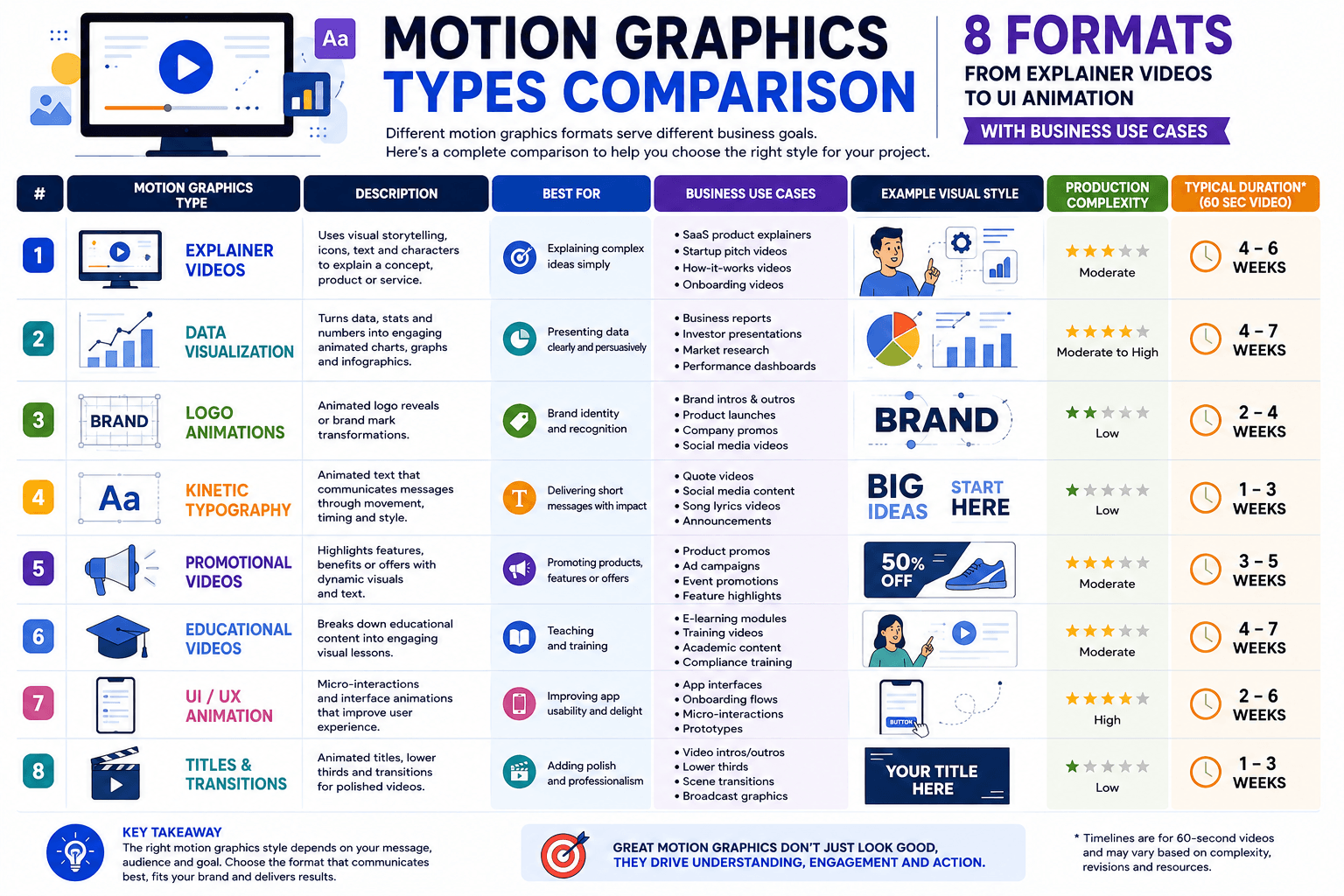
What are motion graphics in practice? Eight distinct formats, each suited to a different business goal. Understanding all eight lets you brief the right format for each campaign rather than defaulting to one type for every need.
What are motion graphics explainer videos? They are 60 to 90-second animated pieces that explain what a product or service does, who it is for, and why someone should choose it, all without requiring a camera, actors, or a physical location. The explainer video is the most produced motion graphics format in business because its fixed length creates a predictable production scope and its purpose maps directly to the highest-value page on most business websites: the homepage or product landing page.
Dropbox's iconic explainer video is the benchmark case study. Built using simple paper cutout animation and motion graphics, it drove a 10% increase in conversions and $48 million in additional annual revenue at scale. The reason is structural, not stylistic: what are motion graphics explainer videos designed to do is address the viewer's core question ("what does this product do?") in the first five seconds and hold attention through a problem-solution-outcome arc. Static text cannot replicate this sequence. Live video cannot update it as cheaply when the product changes.
For businesses evaluating this format, see our explainer video production service and our analysis of explainer video examples that convert.
What are motion graphics in kinetic typography form? Text that moves, scales, reveals, and responds to music or voice-over to deliver a message at pace. This format works without any illustration; the typography itself is the visual element. It is one of the fastest motion graphics formats to produce and one of the most effective for delivering quotations, statistics, brand announcements, and bold messages on social media.
Kinetic typography performs strongly in auto-play social environments where the viewer has no audio. Dynamic text movement catches the eye and delivers the message even in a silent scroll. For B2B brands publishing on LinkedIn, kinetic typography motion graphics outperform static image posts for engagement rate in most categories. The format is also widely used in podcast promotion clips, where the key quote from an episode is animated over an audio waveform.
What are motion graphics in logo animation? A logo sting, typically 3 to 10 seconds, that brings a static brand mark to life with movement, sound design, and motion personality. This is the highest-frequency motion graphic most businesses will produce: it appears at the start and end of every video, in every social post, in every presentation, and in every digital ad. The cumulative brand impression across thousands of views makes it the most cost-effective motion graphics investment available.
A well-designed logo animation communicates the brand's personality before a word is spoken. A fast-paced reveal signals energy. A slow, precise build signals premium. A playful bounce signals approachability. What are motion graphics doing in logo animation is encoding brand values into a movement sequence that the audience absorbs without consciously reading it. For the full range of animation style options that apply to logo and brand motion design, see our 2D animation styles guide.
What are motion graphics infographic animations? They take static data visualisations, charts, process diagrams, and statistical content and animate them to reveal information in sequence rather than all at once. The animated reveal is not a stylistic choice: it is a comprehension tool. When a bar chart fills one segment at a time, the viewer processes each data point in context rather than scanning a crowded static image and missing the key insight.
Infographic motion graphics are particularly effective for investor relations content, board presentations, product launch data, industry reports, and internal communications where complex information must be understood quickly. According to research on visual learning, people retain 65% of information when it is presented visually versus 10% from text alone. Animated infographics compound that advantage by controlling the information reveal sequence. They are also among the most shared content formats on LinkedIn and Twitter, where data-heavy content from credible sources outperforms entertainment formats for professional audiences.
What are motion graphics in a social media context? Short-form animated content built specifically for platform feeds: Instagram Reels, TikTok, LinkedIn posts, YouTube Shorts, and X (Twitter). These differ from longer motion graphics formats in that they are designed for auto-play environments, optimised for viewing without audio, cropped for vertical (9:16) or square (1:1) aspect ratios, and built around a single message or hook rather than a narrative arc.
Research from 2024 shows that motion ads on Instagram and LinkedIn drive 46% higher engagement rates compared to static image posts in the same placements. For paid social advertising, motion graphics consistently outperform static creative in click-through rate and cost per click across most B2B and consumer categories. What are motion graphics doing in social ads that static images cannot is creating the perception of movement in a feed that the human eye is wired to track. In a scroll of static thumbnails, a single animated element draws the eye disproportionately to its size. For SaaS businesses specifically, see our SaaS explainer video service page and motion graphics for SaaS companies guide. Startups can also see our startup explainer video production page.
What are motion graphics in a product design context? UI and UX animation refers to the motion layer inside digital products: micro-interactions (a button that pulses when hovered), loading animations, onboarding sequences, animated icons, scroll-triggered reveals on landing pages, and empty-state illustrations. This is the largest and fastest-growing category of motion graphics by volume, driven by the expectation that digital products should feel alive rather than static.
Lottie (by Airbnb) and Rive are the two dominant formats for web-embedded UI animation, allowing complex motion graphics to be deployed at file sizes that do not slow page load. What are motion graphics doing inside a product that static UI cannot is reducing perceived wait time, directing user attention to the next action, confirming that a system is responding, and making the overall product experience feel more considered and premium. Google research shows that micro-animations reduce task completion time and increase user satisfaction ratings on product interfaces.
What are motion graphics product demos? Animated product walkthroughs that show how a software or physical product works, using animated UI mockups, screen simulations, and motion graphics overlays rather than live screen recordings. The advantage over screen recordings is significant: a motion graphics product demo can show an idealised version of the product workflow, highlight the most compelling features without distraction, maintain brand visual consistency, and be updated when the product changes without a full reshoot.
For SaaS companies, the product demo motion graphic is the second most important video asset after the homepage explainer. It sits in the sales sequence (sent after an initial demo call or embedded in the product evaluation page) and addresses the buyer's practical question: "how does this work in detail?" What are motion graphics doing in a product demo that a screenshare cannot is combining the clarity of design with the authority of animation to make the product feel more polished and production-ready than a live screen recording ever could. See our SaaS onboarding vs explainer video comparison for when each format applies, and our guide on how to use explainer videos in a sales funnel for placement strategy.
What are motion graphics brand films? Premium animated content that communicates a brand's mission, values, culture, or origin story through a combination of motion graphics, character animation, voiceover narration, and original music. These are the highest-investment motion graphics format but also the longest-lived: a well-produced brand film remains usable for 3 to 5 years and anchors every other piece of content the brand produces.
What are motion graphics achieving in a brand film that a live brand video cannot is full creative control over every element of the visual world. There are no casting constraints, no location limitations, no weather dependencies. The brand's visual identity can be expressed with pixel-perfect consistency at every frame. For businesses in competitive categories where differentiation is driven by perceived brand quality rather than product features, the brand film motion graphic is the investment that builds the premium signal every other touchpoint borrows from. See our full range of 2D animation styles and capabilities.
Why Businesses Invest in Motion Graphics
What are motion graphics delivering for businesses beyond aesthetics? Six measurable benefits that explain the $18.4 billion market and the 87% marketer satisfaction rate.
Higher engagement than static ads
Motion ads on digital platforms recorded 46% higher engagement rates than static visual ads in 2024. The human visual system is wired to track movement, giving motion graphics a fundamental advantage in feed-based environments.
Conversion lift from explainer videos
Landing pages featuring an animated explainer video see an average conversion rate increase of up to 83% compared to text-only equivalents. For SaaS businesses, this is the highest single-asset ROI available in the content stack.
Lift in ad recall vs. static
Motion graphics ads produce a 22% higher ad recall rate than equivalent static image ads. For brand awareness campaigns where recall is the primary metric, motion graphics are the most cost-effective format available.
Longer viewer attention
Video content with motion graphics retains viewer attention approximately twice as long as equivalent static content. For complex product explanations that require the viewer to understand multiple steps, this attention extension directly improves information retention.
Lower revision cost vs. live video
When a product changes, a motion graphics video can be updated by revising assets in the source file. The same change in a live video requires a new shoot. Motion graphics cost 80% less to revise than live video at equivalent scope, making them the better long-term investment for products that evolve.
Of agencies use motion graphics in social campaigns
In 2025, 74% of digital marketing agencies used motion graphics in their social media campaigns. What are motion graphics doing that agencies are adopting at this rate? Delivering measurable performance improvements across engagement, recall, and conversion that static formats consistently cannot match.
Ready to add motion graphics to your marketing?
Magic Motion Studio delivers 60-second motion graphics videos in 14 business days. Get in touch to scope your project.
Which Type of Motion Graphics for Which Business Goal?
What are motion graphics best suited to for your specific objective? This framework maps eight common business goals to the right format, so you brief the correct type from the start rather than discovering a mismatch after production.
| Business Goal | Best Motion Graphics Type | Ideal Length | Primary Metric |
|---|---|---|---|
| Explain a complex product or service | Explainer video Most common | 60–90 seconds | Landing page conversion rate |
| Build brand recognition and recall | Logo animation + brand film | 5 sec logo / 60–90 sec film | Ad recall lift, brand sentiment |
| Drive paid social ad performance | Social media motion graphics | 15–30 seconds | CTR, cost per click, ROAS |
| Present data to investors or stakeholders | Infographic animation | 60–120 seconds | Comprehension, share rate |
| Increase SaaS trial-to-paid conversion | Product demo animation | 90–120 seconds | Demo-to-trial rate, activation |
| Announce a message with impact | Kinetic typography | 15–45 seconds | View-through rate, engagement |
| Improve digital product experience | UI and UX animation | Micro (0.2–2 sec loops) | Task completion rate, NPS |
| Build premium brand positioning | Brand storytelling film | 60–180 seconds | Brand perception, PR coverage |
Where Motion Graphics Perform Best: Platform Guide
What are motion graphics delivering on each platform? Format requirements, optimal lengths, and content strategies differ significantly across channels. Producing one motion graphics asset and distributing it everywhere underperforms against producing platform-native versions.
How Motion Graphics Are Produced: 5 Phases
What are motion graphics production timelines in practice? Every motion graphics project passes through these five phases. Understanding each one lets you plan your brief, your feedback commitments, and your launch date accurately.
Total for a 60-second motion graphics explainer: 17 to 34 business days under standard conditions. Magic Motion Studio compresses this to 14 business days through parallel production: illustration, animation, and sound run simultaneously rather than sequentially. For the full phase-by-phase breakdown with day-level specifics, see our guide to 2D animation timelines. For production investment context, see our 2D animation cost guide, explainer video pricing, and our guide on how to measure explainer video ROI.
5 Mistakes Businesses Make with Motion Graphics
What are motion graphics failures costing businesses? These five mistakes are the most common reasons motion graphics investments underperform. Each one is avoidable with the right briefing process.
Starting production before the script is finalised
What are motion graphics built on, fundamentally? A script. Every visual element, including icon count, scene count, character presence, and data displays, is determined by what the script says. Businesses that brief a studio with "we'll finalise the script later" extend the timeline by 1 to 3 weeks and often cause illustration rework when the script changes after assets are designed. The script should be word-for-word approved before any visual work begins.
Choosing the style based on aesthetics rather than audience expectations
What are motion graphics doing for your audience? Building trust, if you choose the right style. Undermining it, if you choose the wrong one. An enterprise SaaS company that uses bright, playful character animation signals immaturity to its target buyer. A consumer wellness brand that uses flat corporate motion graphics feels cold and clinical. The animation style is a brand communication before the script is heard. Matching style to audience expectations is more important than personal preference for the look.
Publishing without captions on social platforms
What are motion graphics losing when published without captions on social media? Between 60 and 85% of their potential impact, depending on the platform. Facebook and Instagram data consistently shows that 85% of videos are watched without audio in feed placements. Motion graphics with voice-over that are published without captions are invisible to the majority of viewers who would have engaged with the message if it had been accessible. This is both a performance mistake and an accessibility failure.
Producing only the hero format and ignoring platform cuts
What are motion graphics assets worth if they only exist in one format? Significantly less than their potential. A 90-second 16:9 explainer video is the hero asset. But the same production can yield a 30-second social cut, a 15-second pre-roll ad, a square crop for Instagram, a vertical cut for Reels and TikTok, and a looping animated GIF for email. All of these come from assets that are already designed. Businesses that brief for the hero asset only and retrofit social formats later pay significantly more per deliverable than businesses that plan the full asset suite from the brief stage.
Not defining success metrics before production begins
What are motion graphics achieving for your business? If you cannot answer this question three months after publishing, the investment cannot be justified for the next production cycle. The most common reason businesses cannot measure motion graphics ROI is that they never defined what success looked like before briefing the studio. Without a baseline conversion rate, engagement rate, or ad performance benchmark, there is no way to attribute improvement to the motion graphics investment specifically.
Motion Graphics That Are Built to Perform, Not Just to Look Good
What are motion graphics at Magic Motion Studio? Purpose-built animated content designed around your conversion goals, your audience, and your platform, delivered in 14 business days. Here is what sets our production process apart.
Script-first production
Every project begins with the script approved before a single asset is designed. This eliminates the most expensive form of rework in motion graphics production.
14 business day delivery
Standard studio timelines for 60-second motion graphics run 6 to 8 weeks. Magic Motion Studio delivers the same quality in 14 business days through a parallel production pipeline.
Toon Boom Harmony studio
We work in Toon Boom Harmony, the professional pipeline used by major studios for asset reuse, multi-layer animation, and format export automation.
Platform-native deliverables
Every production includes exports for all agreed platforms: 16:9 for web, 9:16 for social, 1:1 for Instagram, GIF for email, WebM for web performance. All in one brief.
SaaS and B2B specialist
We produce motion graphics for technology businesses, SaaS platforms, and professional services brands where the buyer is sophisticated and the visual standard must match. See our SaaS explainer video and explainer videos for SaaS companies pages. If your product is complex to explain, see: how to explain a complex SaaS product. For format comparisons, see our 2D animation vs motion graphics breakdown.
Full style range
From flat design motion graphics and kinetic typography to character animation and brand films. The right style for your audience, not the style that is cheapest to produce. Explore the full animation style range.
Frequently Asked Questions
What are motion graphics and how do they differ from animation?
What are motion graphics at the most precise level? Animated graphic design: shapes, typography, icons, data visualisations, and brand assets brought to life through movement. The distinction from character animation is in the intent. What are motion graphics designed to do is communicate information: explain a product, present data, build brand identity, through designed graphic elements in motion. Character animation narrates a story through characters with emotion and dialogue. In practice the two overlap frequently: many explainer videos combine motion graphics (the product UI, the typography, the data overlays) with character animation (the people who use the product). What are motion graphics in isolation is the graphic design layer. The two together create the most effective explainer format for most business use cases.
What are motion graphics used for in business?
What are motion graphics used for across business functions? In marketing: explainer videos on landing pages, social media advertising content, YouTube pre-roll ads, and email animated GIFs. In product: UI micro-interactions, onboarding animations, loading states, and product demo walkthroughs. In sales: animated pitch decks, product demo videos, and proposal leave-behinds. In internal communications: infographic animations for board presentations, training videos, and company announcement content. The common thread across all uses is that what are motion graphics doing is making information easier to understand and retain than the equivalent static format, at a production cost and update cost lower than live video.
What are motion graphics types most used in marketing?
The eight most used types are: explainer videos, kinetic typography, logo animation, infographic animation, social media motion graphics, UI and UX animation, product demo animation, and brand storytelling films. For marketing and advertising budgets, what are motion graphics performing strongest? Explainer videos for conversion, social media motion graphics for engagement and ad performance, and infographic animation for B2B thought leadership content. Logo animation is the highest-frequency touchpoint and the most cost-efficient single investment in the motion graphics stack.
How long does it take to produce motion graphics?
Production timelines vary by format and complexity. A 15 to 30-second social media motion graphic takes 2 to 4 weeks. A 60-second explainer video takes 6 to 8 weeks at standard studio pace. Logo animation takes 1 to 2 weeks. Infographic animation for a 60 to 90-second piece takes 3 to 5 weeks. Magic Motion Studio delivers 60-second motion graphics in 14 business days through a dedicated parallel production pipeline. The single biggest variable in all timelines is script readiness: what are motion graphics production timelines most sensitive to is how prepared the client is when production begins. A locked script on Day 1 is the most reliable predictor of on-time delivery. See our full animation production timeline guide, our explainer video storyboard guide, and how long an explainer video should be.
What are motion graphics software tools used by professionals?
Professional motion graphics studios use Adobe After Effects as the primary compositing and motion design tool, Adobe Illustrator and Photoshop for static asset creation, Cinema 4D for 3D motion graphics elements, Toon Boom Harmony for character-integrated motion graphics, and Lottie or Rive for web-deployed UI animation. After Effects is the industry standard for the explainer video, social advertising, and infographic animation formats. Toon Boom Harmony is the professional pipeline standard for character animation integrated with motion graphics. Magic Motion Studio operates as a Toon Boom Harmony studio for all character-based production.
What are motion graphics KPIs businesses should track?
The primary KPIs for motion graphics vary by placement. For landing page explainer videos: conversion rate change before and after the video is added, measured over 30 to 60 days of comparable traffic. For social media motion graphics: engagement rate versus static posts in the same period, CTR on paid placements, and cost per click versus static creative. For email animated content: click-through rate versus static email equivalents in A/B tests. For brand awareness campaigns: ad recall lift (measured through brand lift studies on Google and Meta) and share rate. What are motion graphics performing against these KPIs at Magic Motion Studio? Clients consistently report 20 to 40% conversion rate improvements on landing pages featuring our explainer videos.
What are motion graphics costs for a 60-second video?
Motion graphics production costs vary significantly by style, studio tier, and asset complexity. Simple flat design motion graphics: $1,500 to $5,000 for 60 seconds from a freelancer or budget studio. Mid-tier motion graphics with custom illustration and character elements: $5,000 to $12,000 from a professional studio. Premium cinematic motion graphics with 3D elements and full sound design: $15,000 and above. What are motion graphics costing per unit of ROI? For landing page explainers with documented conversion lift, the payback period is typically 1 to 3 months at standard B2B traffic volumes. For full investment context, see our 2D animation cost guide.
Ready to Put Motion Graphics to Work for Your Business?
Tell us your goal and we will recommend the right motion graphics format, timeline, and approach before you commit to anything.
Related Guides
- What Is an Explainer Video? Types, Styles and Examples
- What Is 2D Animation? Complete Guide for Businesses
- 2D Animation Studio: Character Animation & Motion Graphics
- 2D Animation vs Motion Graphics: Which Should You Choose?
- 2D Animation Styles: Flat Design, Frame-by-Frame, Cutout and More
- Explainer Video Examples That Convert: 12 Real-World Results
- Explainer Video Cost in the USA: 2026 Pricing Guide