
SaaS Onboarding vs Explainer Video: Which One Does Your Product Actually Need?
The brief is almost always the same: "we need a video." The question that follows: which kind? That is where most SaaS teams make an expensive mistake. This guide breaks down the SaaS onboarding vs explainer video decision at every level, including where each lives, how each is built, and which to commission first.
The Wrong Video in the Right Channel Still Fails
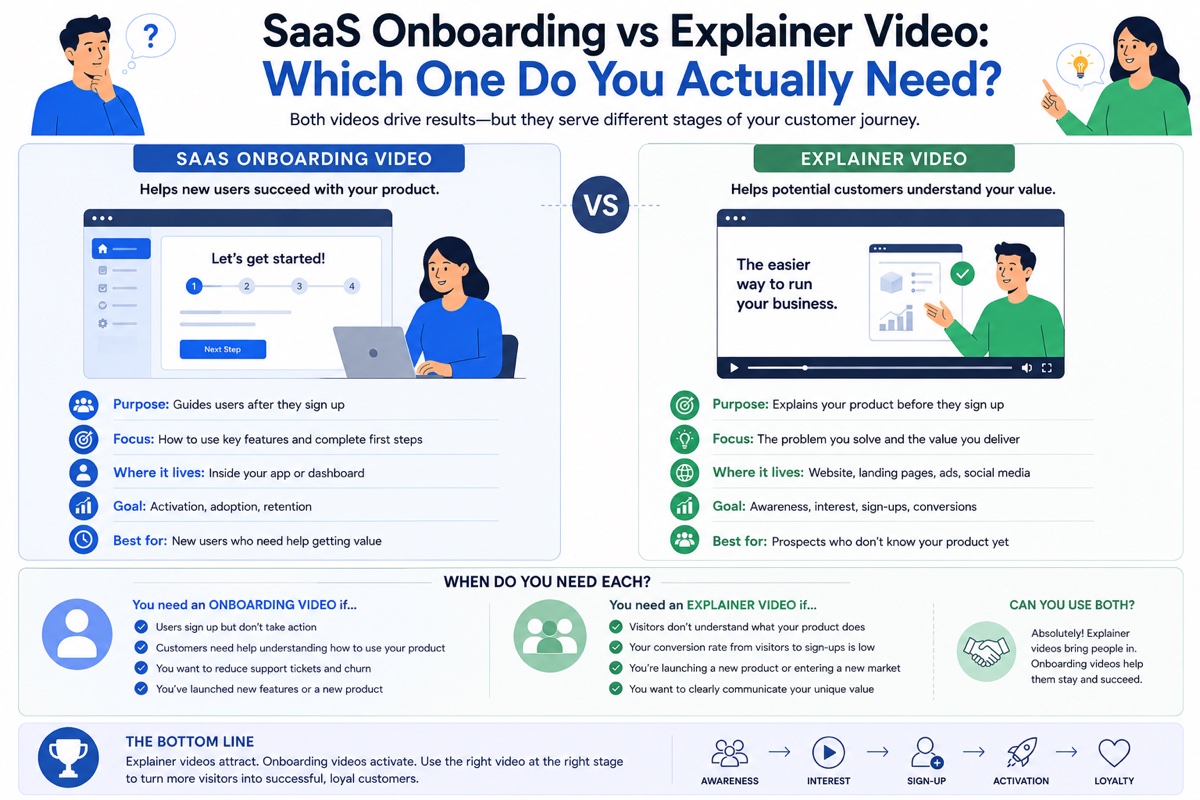
Most SaaS teams know they need video. What they often do not know is that the SaaS onboarding vs explainer video decision is not a preference: it is a placement question. Each type is built for a specific audience, at a specific moment, with a specific goal. Swap their positions and both fail.
A homepage explainer sits in front of someone who has never heard of your product and is deciding whether to care. An onboarding video sits inside your product, in front of someone who has already decided to sign up and is deciding whether to stay. The audience is different. The job is different. The script structure is different. The success metric is different. Treating them as interchangeable formats is the single most common video strategy mistake in early-stage SaaS.
With 75% of SaaS users churning in their first week and the average activation rate sitting at just 37.5% in 2026, the cost of mismatch is not theoretical. Every day a signed-up user encounters video content aimed at convincing them to sign up is a day they do not reach their first meaningful win inside your product.
Three Videos. Three Jobs. Zero Overlap.
The SaaS onboarding vs explainer video distinction begins with precise definitions. These three video types are regularly confused because they all involve the same product, but they address completely different viewers at completely different moments in the relationship with your product.
A short animated video for people who have never used your product. Its job is to convert cold awareness into genuine interest or a trial signup in 60 to 90 seconds.
- Homepage hero
- Paid social and search ads
- Outbound email sequences
- Trade show and pitch decks
A format that bridges marketing and onboarding. It shows the product working in specific detail for buyers in the evaluation phase who need to see before they commit.
- Product features pages
- Sales follow-up emails
- Post-demo leave-behinds
- Comparison landing pages
A short instructional video (30 to 90 seconds per module) for people who have already signed up. Its job is to get the user to their first meaningful win inside your product as fast as possible.
- Welcome email sequences
- In-product tooltip flows
- Help centre and knowledge base
- Onboarding checklists
The practical implication: if someone watches your video before deciding whether to sign up, it is an explainer video. If they watch it after signing up while deciding whether to stay, it is an onboarding video. The funnel position dictates the brief, not the format preference of the team commissioning it.
SaaS Onboarding vs Explainer Video: Every Dimension Compared
The table below maps every key dimension of this decision so your team can align on format before commissioning any production work.
| Explainer Video | Onboarding Video | |
|---|---|---|
| Primary Audience | Cold prospects who have not yet signed up | Users who have already signed up and are trying to succeed |
| Goal | Convert cold awareness into trial signup or demo request | Get the user to their first meaningful product win |
| Funnel Stage | TOFU / MOFU Awareness and interest | Post-signup Activation and retention |
| Typical Length | 60 to 90 seconds (up to 2 min for complex products) | 30 to 90 seconds per clip; delivered as a library, not one video |
| Format | Animated: 2D flat design, motion graphics, character animation | Screen recording or animated UI mockup; rarely full animation |
| Success Metric | CTR, trial signup rate, homepage conversion rate | Activation rate, day-7 retention, first-week support ticket volume |
| Script Tone | Problem-agitation-solution-proof-CTA. Emotionally driven, persuasive. | Name the task. Show it. Confirm the outcome. Instructional, not persuasive. |
| Asset Count | 1 hero video plus a 15-second social cut | A library of task-specific clips; one video per key user action |
| Product UI Shown? | Rarely, or stylized and abstracted for visual clarity | Always; either real interface (screen recording) or accurate mockup |
| When to Build | At or before launch; required before meaningful marketing spend | Post-launch when activation data or support volume identifies the drop-off point |
What Happens When the SaaS Onboarding vs Explainer Video Choice Goes Wrong
The SaaS onboarding vs explainer video distinction seems obvious when it is written out. In practice, teams regularly commission the wrong type, place it in the wrong position, and then wonder why it did not perform. These two scenarios are the most common failures.
A project management SaaS places their animated homepage explainer inside the post-signup welcome screen. The video begins: "Teams who use this tool close 40% more deals and save 12 hours per week on reporting." Footage shows a stylized UI with no labels. A confident narrator describes the problem of scattered workflows. The CTA at the end is "Start your free trial."
The user watching this has already started their free trial. They signed up because they already believe the product can help them. What they need to know is where to click to create their first project. The video answers a question they stopped asking three minutes ago.
What happens: users skip it, close the tab, or navigate away to find written documentation. The activation event never happens. The churn that follows looks like a product problem. It is a video placement problem.
A B2B SaaS company replaces their animated homepage hero with a 3-minute screen recording tutorial showing existing users how to build their first workflow. The team is proud of the production. The tutorial is genuinely helpful. It shows the real product interface. It covers every step clearly.
Cold traffic lands from a Google ad. They see a cursor clicking through a dense UI they have zero context for. Settings panels open. Dropdown menus appear. Fields are filled in. None of it means anything to someone who does not yet know what the product does or why they should care about it.
The visitor's question is "what is this and why does it exist?" The tutorial's answer is "here is how to use it correctly." That sequence is backwards. The visitor needed to be sold before they could be taught.
Tell us where you are losing users and we will identify the right format and placement.
Which Video Should You Commission First?
For most SaaS teams, the SaaS onboarding vs explainer video build order is clear: start with the explainer, add onboarding videos once the pipeline is active. Without the explainer video working, there are no new users for onboarding videos to help. But specific signals tell you when to prioritise each.
What Each Video Should Actually Look Like
The SaaS onboarding vs explainer video distinction goes beyond placement. The format, script structure, visual approach, and delivery are different enough that commissioning both from the same brief is a common production mistake. Here is what each format requires.
This question only applies to onboarding videos. Explainer videos are almost always animated. For onboarding, the choice between these two formats depends on your product's pace of change and the complexity of what you are showing.
Answer these six questions before commissioning any SaaS video. Each question has a direct answer that points to the right format. If your answers split between both columns, you likely need both video types at different placements.
How to Measure Success for Each Video Type
One of the clearest markers that a team is treating the SaaS onboarding vs explainer video decision correctly is that they are measuring each format by entirely different metrics. When the same KPIs are applied to both video types, it is usually a sign that the purpose distinction has not been made cleanly.
Explainer Video Metrics
Getting the SaaS onboarding vs explainer video measurement right starts with understanding that each format has an entirely different job. The explainer video's job is pre-signup conversion. The metrics that measure it are all pre-signup: homepage conversion rate (what percentage of homepage visitors start a trial), ad CTR (does the video creative get the click from cold audiences), and view-to-signup rate when the video is embedded on a landing page. Video on landing pages lifts conversions by up to 86% in documented testing, making the baseline conversion rate of a page without the video your clearest benchmark for what the explainer is delivering.
Secondary metrics include video completion rate (how far down the video cold viewers watch before dropping off) and share rate on social cuts. These signal whether the script and creative are working before the viewer reaches the CTA. For a full breakdown of tracking approach, see our guide on how to measure explainer video ROI.
Onboarding Video Metrics
The onboarding video's job is post-signup activation and retention. The primary metric is activation rate: the percentage of new signups who reach a defined first meaningful win within the first 7 days. The 2026 benchmark for SaaS activation is 37.5%, meaning more than six in ten new users never reach the core value event of the product they signed up for. Onboarding video performance is measured as the activation rate delta between users who watched the relevant clip and those who did not.
Secondary metrics are day-7 retention (the percentage of signups who return to the product on day seven), first-week support ticket volume per cohort, and video completion rate within the help centre or in-product tooltip flow. If users who watch a specific onboarding clip create 40% fewer support tickets on that feature than users who do not, that clip is delivering measurable ROI and can be prioritised for animated UI upgrade in the next production cycle.
Research from 2026 shows that in-app plus email hybrid onboarding beats email-only day-30 retention by 27 percentage points. Video within that in-app flow is the highest-completion, lowest-friction format for delivering activation guidance.
Which SaaS Companies Need Both, and When
The SaaS onboarding vs explainer video question is often framed as a choice. In practice, every SaaS company beyond the earliest stage needs both. The difference is sequencing. The explainer video fills the pipeline. Onboarding videos keep the users the pipeline delivers. Running the explainer without onboarding videos means spending marketing budget to acquire users you then lose. Running onboarding videos without an explainer means building retention infrastructure for a user base that is not growing fast enough.
The data on both sides of this supports the same conclusion: only 23% of video marketers have created customer onboarding videos, despite 63% of users preferring video to learn a product. That gap is where the retention advantage lies for SaaS companies willing to invest in both formats and deploy each in its correct position.
Teams still working through the SaaS onboarding vs explainer video decision can use the funnel placement map above to confirm where each asset sits. For teams placing explainer videos in a sales funnel context, the map provides the precise position for each asset type. For teams still at the stage of commissioning their first video, the decision framework section above gives the build-order logic needed to sequence investment correctly.
We Produce Both. We Do Not Treat Them as the Same Brief.
Every team that comes to us working through the SaaS onboarding vs explainer video decision arrives with different underlying data. Some have traffic and no activation. Some have activation and no pipeline. Magic Motion Studio starts with that data before starting with the brief, so the right brief gets written for the right format.
Separate briefs, separate process
We run distinct production processes for explainer and onboarding video commissions. The script framework, visual approach, and success metrics are different for each. We do not apply a single template to both.
Explainer video built from the buyer's perspective
For SaaS explainer videos, our script process starts with the buyer persona and the specific decision point the video needs to move. We write to a conversion event, not to a product description.
Onboarding video built from activation data
For onboarding commissions, we start with your drop-off data and support ticket patterns. We identify the specific moment users fail to activate and build the clip to address that moment. One video, one task, one measurable lift.
Animated UI mockups for fast-moving products
For SaaS products whose UI changes rapidly, we produce animated UI mockups rather than screen recordings. This extends the shelf life of your onboarding video library and maintains visual consistency with your marketing video assets.
14-business-day delivery
Standard delivery for a 60-second animated explainer video is 14 business days from a locked script. We run illustration, animation, and sound in parallel rather than sequentially to hit that window reliably.
SaaS specialist
We focus on technology and SaaS clients. See our work with SaaS companies, startup teams, and complex B2B products that need the invisible made visible before a buyer will commit.
For related reading on SaaS video strategy: see our guides on SaaS explainer video production, how to explain a complex SaaS product, explainer video examples that convert, how to use explainer videos in a sales funnel, how to measure explainer video ROI, explainer videos for SaaS companies, 2D animation styles and which to choose, explainer video storyboard guide, how long 2D animation takes to produce, what are motion graphics, explainer video pricing, and what is an explainer video. For SaaS onboarding statistics, see UserGuiding's 2026 onboarding statistics report. For video marketing data cited in this guide, see Wyzowl's 2026 video marketing statistics.
Frequently Asked Questions
A SaaS onboarding vs explainer video comparison comes down to audience and funnel position. An explainer video is designed for people who have not yet signed up. It communicates product value in 60 to 90 seconds and sits on your homepage, in ads, and in outbound campaigns. An onboarding video is designed for people who have already signed up. It guides them through their first actions inside the product and lives in welcome emails, in-product tooltip flows, and your help centre. The audience, goal, placement, format, and success metric of each are entirely different. Confusing them is one of the most common SaaS video strategy mistakes.
Rarely, and not without significant editing. An explainer video is built to answer "why should I care about this product?" An onboarding video is built to answer "what do I click first?" Using an explainer inside your product after signup creates friction because the user has already decided to care. They need instruction, not persuasion. The scripts, formats, and success metrics for each video type are different enough that treating them as the same asset is costly. The one exception is a product with a very short, simple onboarding path where a single clear explainer can also orient new users. For most SaaS products with more than two or three distinct activation steps, that exception does not apply.
The primary metrics for onboarding video success are activation rate, day-seven retention, and first-week support ticket volume. Activation rate measures the percentage of new signups who reach their first meaningful product win. Day-seven retention measures whether users return on day seven after signing up. Support ticket volume measures whether the video reduced the operational cost of first-use confusion. A secondary metric is video completion rate within your help centre or in-product flow. Unlike explainer video metrics (CTR, signup rate), onboarding video metrics are all post-signup. The clearest way to measure a specific clip is to compare activation rates between users who watched it and those who did not. For a fuller measurement framework, see our guide on how to measure explainer video ROI.
Individual onboarding video clips should be 30 to 90 seconds each. Unlike explainer videos, onboarding videos are not a single asset. They are a library of short task-specific clips, each addressing one specific user action. One clip for account setup. One for inviting a team member. One for creating the first project. Keeping each clip under 90 seconds and task-focused dramatically improves completion rate compared to a single long product walkthrough. A user who cannot find a specific clip quickly will abandon the library and contact support instead. Short, searchable, and task-named is the correct production approach.
60 to 90 seconds for most B2B SaaS products. Complex multi-stakeholder products with several distinct value propositions can justify up to 2 minutes if each added second is working to advance a specific decision. Below 60 seconds, the message tends to feel incomplete for most B2B products with more than one buyer persona or use case. Above 90 seconds, completion rates drop significantly for cold audiences who have not yet committed to the product. The 60 to 90 second range consistently outperforms shorter and longer formats in documented conversion testing. When in doubt, target 75 seconds and cut anything that does not directly advance the buyer's decision.
Build the explainer video first. The explainer fills the pipeline by converting cold traffic into signups. Without a steady flow of new signups, there is no user base for onboarding videos to help, and no activation data to identify which moments need addressing. Once you have users and can see where they drop off in the first week, commission onboarding videos targeted at those exact moments. The practical signal for when to start building onboarding videos is when your support team answers the same first-use question more than three times per week. That question is a video brief waiting to be written. For more on SaaS explainer video production at launch stage, see our dedicated guide.
Yes. Animated UI mockups are often the better long-term investment over screen recordings for SaaS onboarding videos, particularly for fast-moving products. Screen recordings go stale with every UI update. A redesigned button or renamed menu item turns your whole library inaccurate overnight. An animated UI mockup can be updated more efficiently, looks more polished, and lets you simplify the interface visually so users focus on the key action. Animation works best for concept-level onboarding (explaining what a feature does before showing how to use it). Screen recordings work best for exact step-by-step tutorials where the user needs to see precisely where to click. For most SaaS products, the optimal approach uses both formats deployed to different clip types.
Know Which Video You Need. Now Commission It.
Whether your product needs an animated explainer to fill the pipeline or an onboarding video library to fix first-week churn, we build both. Tell us where you are losing users and we will start with the brief that delivers the fastest measurable result.
Related Guides
Further reading on the SaaS onboarding vs explainer video topic and related video strategy for SaaS companies:
- What Is an Explainer Video? Types, Styles and Examples
- What Is 2D Animation? Complete Guide for Businesses
- 2D Animation Studio: Character Animation & Motion Graphics
- What Are Motion Graphics? Guide for Businesses
- Explainer Videos for SaaS Companies
- How to Explain a Complex SaaS Product
- Explainer Video Examples That Convert: 12 Real-World Results
- How to Measure Explainer Video ROI
- Explainer Video Cost in the USA: 2026 Pricing Guide
SaaS Onboarding vs Explainer Video: Which One Does Your Product Actually Need?
The brief is almost always the same: "we need a video." The question that follows: which kind? That is where most SaaS teams make an expensive mistake. This guide breaks down the SaaS onboarding vs explainer video decision at every level, including where each lives, how each is built, and which to commission first.
The Wrong Video in the Right Channel Still Fails
Most SaaS teams know they need video. What they often do not know is that the SaaS onboarding vs explainer video decision is not a preference: it is a placement question. Each type is built for a specific audience, at a specific moment, with a specific goal. Swap their positions and both fail.
A homepage explainer sits in front of someone who has never heard of your product and is deciding whether to care. An onboarding video sits inside your product, in front of someone who has already decided to sign up and is deciding whether to stay. The audience is different. The job is different. The script structure is different. The success metric is different. Treating them as interchangeable formats is the single most common video strategy mistake in early-stage SaaS.
With 75% of SaaS users churning in their first week and the average activation rate sitting at just 37.5% in 2026, the cost of mismatch is not theoretical. Every day a signed-up user encounters video content aimed at convincing them to sign up is a day they do not reach their first meaningful win inside your product.
Three Videos. Three Jobs. Zero Overlap.
The SaaS onboarding vs explainer video distinction begins with precise definitions. These three video types are regularly confused because they all involve the same product, but they address completely different viewers at completely different moments in the relationship with your product.
A short animated video for people who have never used your product. Its job is to convert cold awareness into genuine interest or a trial signup in 60 to 90 seconds.
- Homepage hero
- Paid social and search ads
- Outbound email sequences
- Trade show and pitch decks
A format that bridges marketing and onboarding. It shows the product working in specific detail for buyers in the evaluation phase who need to see before they commit.
- Product features pages
- Sales follow-up emails
- Post-demo leave-behinds
- Comparison landing pages
A short instructional video (30 to 90 seconds per module) for people who have already signed up. Its job is to get the user to their first meaningful win inside your product as fast as possible.
- Welcome email sequences
- In-product tooltip flows
- Help centre and knowledge base
- Onboarding checklists
The practical implication: if someone watches your video before deciding whether to sign up, it is an explainer video. If they watch it after signing up while deciding whether to stay, it is an onboarding video. The funnel position dictates the brief, not the format preference of the team commissioning it.
SaaS Onboarding vs Explainer Video: Every Dimension Compared
The table below maps every key dimension of this decision so your team can align on format before commissioning any production work.
| Explainer Video | Onboarding Video | |
|---|---|---|
| Primary Audience | Cold prospects who have not yet signed up | Users who have already signed up and are trying to succeed |
| Goal | Convert cold awareness into trial signup or demo request | Get the user to their first meaningful product win |
| Funnel Stage | TOFU / MOFU Awareness and interest | Post-signup Activation and retention |
| Typical Length | 60 to 90 seconds (up to 2 min for complex products) | 30 to 90 seconds per clip; delivered as a library, not one video |
| Format | Animated: 2D flat design, motion graphics, character animation | Screen recording or animated UI mockup; rarely full animation |
| Success Metric | CTR, trial signup rate, homepage conversion rate | Activation rate, day-7 retention, first-week support ticket volume |
| Script Tone | Problem-agitation-solution-proof-CTA. Emotionally driven, persuasive. | Name the task. Show it. Confirm the outcome. Instructional, not persuasive. |
| Asset Count | 1 hero video plus a 15-second social cut | A library of task-specific clips; one video per key user action |
| Product UI Shown? | Rarely, or stylized and abstracted for visual clarity | Always; either real interface (screen recording) or accurate mockup |
| When to Build | At or before launch; required before meaningful marketing spend | Post-launch when activation data or support volume identifies the drop-off point |
What Happens When the SaaS Onboarding vs Explainer Video Choice Goes Wrong
The SaaS onboarding vs explainer video distinction seems obvious when it is written out. In practice, teams regularly commission the wrong type, place it in the wrong position, and then wonder why it did not perform. These two scenarios are the most common failures.
A project management SaaS places their animated homepage explainer inside the post-signup welcome screen. The video begins: "Teams who use this tool close 40% more deals and save 12 hours per week on reporting." Footage shows a stylized UI with no labels. A confident narrator describes the problem of scattered workflows. The CTA at the end is "Start your free trial."
The user watching this has already started their free trial. They signed up because they already believe the product can help them. What they need to know is where to click to create their first project. The video answers a question they stopped asking three minutes ago.
What happens: users skip it, close the tab, or navigate away to find written documentation. The activation event never happens. The churn that follows looks like a product problem. It is a video placement problem.
A B2B SaaS company replaces their animated homepage hero with a 3-minute screen recording tutorial showing existing users how to build their first workflow. The team is proud of the production. The tutorial is genuinely helpful. It shows the real product interface. It covers every step clearly.
Cold traffic lands from a Google ad. They see a cursor clicking through a dense UI they have zero context for. Settings panels open. Dropdown menus appear. Fields are filled in. None of it means anything to someone who does not yet know what the product does or why they should care about it.
The visitor's question is "what is this and why does it exist?" The tutorial's answer is "here is how to use it correctly." That sequence is backwards. The visitor needed to be sold before they could be taught.
Tell us where you are losing users and we will identify the right format and placement.
Which Video Should You Commission First?
For most SaaS teams, the SaaS onboarding vs explainer video build order is clear: start with the explainer, add onboarding videos once the pipeline is active. Without the explainer video working, there are no new users for onboarding videos to help. But specific signals tell you when to prioritise each.
What Each Video Should Actually Look Like
The SaaS onboarding vs explainer video distinction goes beyond placement. The format, script structure, visual approach, and delivery are different enough that commissioning both from the same brief is a common production mistake. Here is what each format requires.
This question only applies to onboarding videos. Explainer videos are almost always animated. For onboarding, the choice between these two formats depends on your product's pace of change and the complexity of what you are showing.
Answer these six questions before commissioning any SaaS video. Each question has a direct answer that points to the right format. If your answers split between both columns, you likely need both video types at different placements.
How to Measure Success for Each Video Type
One of the clearest markers that a team is treating the SaaS onboarding vs explainer video decision correctly is that they are measuring each format by entirely different metrics. When the same KPIs are applied to both video types, it is usually a sign that the purpose distinction has not been made cleanly.
Explainer Video Metrics
Getting the SaaS onboarding vs explainer video measurement right starts with understanding that each format has an entirely different job. The explainer video's job is pre-signup conversion. The metrics that measure it are all pre-signup: homepage conversion rate (what percentage of homepage visitors start a trial), ad CTR (does the video creative get the click from cold audiences), and view-to-signup rate when the video is embedded on a landing page. Video on landing pages lifts conversions by up to 86% in documented testing, making the baseline conversion rate of a page without the video your clearest benchmark for what the explainer is delivering.
Secondary metrics include video completion rate (how far down the video cold viewers watch before dropping off) and share rate on social cuts. These signal whether the script and creative are working before the viewer reaches the CTA. For a full breakdown of tracking approach, see our guide on how to measure explainer video ROI.
Onboarding Video Metrics
The onboarding video's job is post-signup activation and retention. The primary metric is activation rate: the percentage of new signups who reach a defined first meaningful win within the first 7 days. The 2026 benchmark for SaaS activation is 37.5%, meaning more than six in ten new users never reach the core value event of the product they signed up for. Onboarding video performance is measured as the activation rate delta between users who watched the relevant clip and those who did not.
Secondary metrics are day-7 retention (the percentage of signups who return to the product on day seven), first-week support ticket volume per cohort, and video completion rate within the help centre or in-product tooltip flow. If users who watch a specific onboarding clip create 40% fewer support tickets on that feature than users who do not, that clip is delivering measurable ROI and can be prioritised for animated UI upgrade in the next production cycle.
Research from 2026 shows that in-app plus email hybrid onboarding beats email-only day-30 retention by 27 percentage points. Video within that in-app flow is the highest-completion, lowest-friction format for delivering activation guidance.
Which SaaS Companies Need Both, and When
The SaaS onboarding vs explainer video question is often framed as a choice. In practice, every SaaS company beyond the earliest stage needs both. The difference is sequencing. The explainer video fills the pipeline. Onboarding videos keep the users the pipeline delivers. Running the explainer without onboarding videos means spending marketing budget to acquire users you then lose. Running onboarding videos without an explainer means building retention infrastructure for a user base that is not growing fast enough.
The data on both sides of this supports the same conclusion: only 23% of video marketers have created customer onboarding videos, despite 63% of users preferring video to learn a product. That gap is where the retention advantage lies for SaaS companies willing to invest in both formats and deploy each in its correct position.
Teams still working through the SaaS onboarding vs explainer video decision can use the funnel placement map above to confirm where each asset sits. For teams placing explainer videos in a sales funnel context, the map provides the precise position for each asset type. For teams still at the stage of commissioning their first video, the decision framework section above gives the build-order logic needed to sequence investment correctly.
We Produce Both. We Do Not Treat Them as the Same Brief.
Every team that comes to us working through the SaaS onboarding vs explainer video decision arrives with different underlying data. Some have traffic and no activation. Some have activation and no pipeline. Magic Motion Studio starts with that data before starting with the brief, so the right brief gets written for the right format.
Separate briefs, separate process
We run distinct production processes for explainer and onboarding video commissions. The script framework, visual approach, and success metrics are different for each. We do not apply a single template to both.
Explainer video built from the buyer's perspective
For SaaS explainer videos, our script process starts with the buyer persona and the specific decision point the video needs to move. We write to a conversion event, not to a product description.
Onboarding video built from activation data
For onboarding commissions, we start with your drop-off data and support ticket patterns. We identify the specific moment users fail to activate and build the clip to address that moment. One video, one task, one measurable lift.
Animated UI mockups for fast-moving products
For SaaS products whose UI changes rapidly, we produce animated UI mockups rather than screen recordings. This extends the shelf life of your onboarding video library and maintains visual consistency with your marketing video assets.
14-business-day delivery
Standard delivery for a 60-second animated explainer video is 14 business days from a locked script. We run illustration, animation, and sound in parallel rather than sequentially to hit that window reliably.
SaaS specialist
We focus on technology and SaaS clients. See our work with SaaS companies, startup teams, and complex B2B products that need the invisible made visible before a buyer will commit.
For related reading on SaaS video strategy: see our guides on SaaS explainer video production, how to explain a complex SaaS product, explainer video examples that convert, how to use explainer videos in a sales funnel, how to measure explainer video ROI, explainer videos for SaaS companies, 2D animation styles and which to choose, explainer video storyboard guide, how long 2D animation takes to produce, what are motion graphics, explainer video pricing, and what is an explainer video. For SaaS onboarding statistics, see UserGuiding's 2026 onboarding statistics report. For video marketing data cited in this guide, see Wyzowl's 2026 video marketing statistics.
Frequently Asked Questions
A SaaS onboarding vs explainer video comparison comes down to audience and funnel position. An explainer video is designed for people who have not yet signed up. It communicates product value in 60 to 90 seconds and sits on your homepage, in ads, and in outbound campaigns. An onboarding video is designed for people who have already signed up. It guides them through their first actions inside the product and lives in welcome emails, in-product tooltip flows, and your help centre. The audience, goal, placement, format, and success metric of each are entirely different. Confusing them is one of the most common SaaS video strategy mistakes.
Rarely, and not without significant editing. An explainer video is built to answer "why should I care about this product?" An onboarding video is built to answer "what do I click first?" Using an explainer inside your product after signup creates friction because the user has already decided to care. They need instruction, not persuasion. The scripts, formats, and success metrics for each video type are different enough that treating them as the same asset is costly. The one exception is a product with a very short, simple onboarding path where a single clear explainer can also orient new users. For most SaaS products with more than two or three distinct activation steps, that exception does not apply.
The primary metrics for onboarding video success are activation rate, day-seven retention, and first-week support ticket volume. Activation rate measures the percentage of new signups who reach their first meaningful product win. Day-seven retention measures whether users return on day seven after signing up. Support ticket volume measures whether the video reduced the operational cost of first-use confusion. A secondary metric is video completion rate within your help centre or in-product flow. Unlike explainer video metrics (CTR, signup rate), onboarding video metrics are all post-signup. The clearest way to measure a specific clip is to compare activation rates between users who watched it and those who did not. For a fuller measurement framework, see our guide on how to measure explainer video ROI.
Individual onboarding video clips should be 30 to 90 seconds each. Unlike explainer videos, onboarding videos are not a single asset. They are a library of short task-specific clips, each addressing one specific user action. One clip for account setup. One for inviting a team member. One for creating the first project. Keeping each clip under 90 seconds and task-focused dramatically improves completion rate compared to a single long product walkthrough. A user who cannot find a specific clip quickly will abandon the library and contact support instead. Short, searchable, and task-named is the correct production approach.
60 to 90 seconds for most B2B SaaS products. Complex multi-stakeholder products with several distinct value propositions can justify up to 2 minutes if each added second is working to advance a specific decision. Below 60 seconds, the message tends to feel incomplete for most B2B products with more than one buyer persona or use case. Above 90 seconds, completion rates drop significantly for cold audiences who have not yet committed to the product. The 60 to 90 second range consistently outperforms shorter and longer formats in documented conversion testing. When in doubt, target 75 seconds and cut anything that does not directly advance the buyer's decision.
Build the explainer video first. The explainer fills the pipeline by converting cold traffic into signups. Without a steady flow of new signups, there is no user base for onboarding videos to help, and no activation data to identify which moments need addressing. Once you have users and can see where they drop off in the first week, commission onboarding videos targeted at those exact moments. The practical signal for when to start building onboarding videos is when your support team answers the same first-use question more than three times per week. That question is a video brief waiting to be written. For more on SaaS explainer video production at launch stage, see our dedicated guide.
Yes. Animated UI mockups are often the better long-term investment over screen recordings for SaaS onboarding videos, particularly for fast-moving products. Screen recordings go stale with every UI update. A redesigned button or renamed menu item turns your whole library inaccurate overnight. An animated UI mockup can be updated more efficiently, looks more polished, and lets you simplify the interface visually so users focus on the key action. Animation works best for concept-level onboarding (explaining what a feature does before showing how to use it). Screen recordings work best for exact step-by-step tutorials where the user needs to see precisely where to click. For most SaaS products, the optimal approach uses both formats deployed to different clip types.
Know Which Video You Need. Now Commission It.
Whether your product needs an animated explainer to fill the pipeline or an onboarding video library to fix first-week churn, we build both. Tell us where you are losing users and we will start with the brief that delivers the fastest measurable result.
Related Guides
Further reading on the SaaS onboarding vs explainer video topic and related video strategy for SaaS companies:
- What Is an Explainer Video? Types, Styles and Examples
- What Is 2D Animation? Complete Guide for Businesses
- 2D Animation Studio: Character Animation & Motion Graphics
- What Are Motion Graphics? Guide for Businesses
- Explainer Videos for SaaS Companies
- How to Explain a Complex SaaS Product
- Explainer Video Examples That Convert: 12 Real-World Results
- How to Measure Explainer Video ROI
- Explainer Video Cost in the USA: 2026 Pricing Guide