
Explainer Video Storyboard: What to Expect at Every Stage (2026)
An explainer video storyboard is a frame-by-frame visual plan of your video, created after the script is approved and before animation begins. Each frame contains a rough visual sketch, the voiceover line it accompanies, a frame duration, and animation notes for the production team. A 60-second video produces 10 to 12 frames. The storyboard phase takes 1 to 2 weeks from script lock to final approval. This guide covers what every frame contains, how to review it intelligently, how to give feedback your studio can act on, and what approving the storyboard commits you to.
Most guides about the explainer video storyboard are written for animators, creative directors, and in-house designers. They explain which software to use, how to draw panels, and how to plan transitions. None of them tell a client commissioning a video what is actually about to arrive in their inbox, what they are being asked to approve, or what happens if they get it wrong.
That is what this guide covers. Whether you are receiving your first explainer video storyboard from a production studio or evaluating a new supplier and want to understand their process, this article walks you through every stage: what the document looks like, how many frames to expect, how to review each one intelligently, how to give feedback your studio can act on, and what approving the storyboard actually commits you to before animation begins.
The storyboard stage is where the quality of your final video is decided. According to Wyzowl's 2026 Video Marketing Statistics, 96% of consumers have watched an explainer video to learn about a product or service. Get the storyboard stage right and the animation runs smoothly. Miss something here and you pay for it in time and revision scope later.
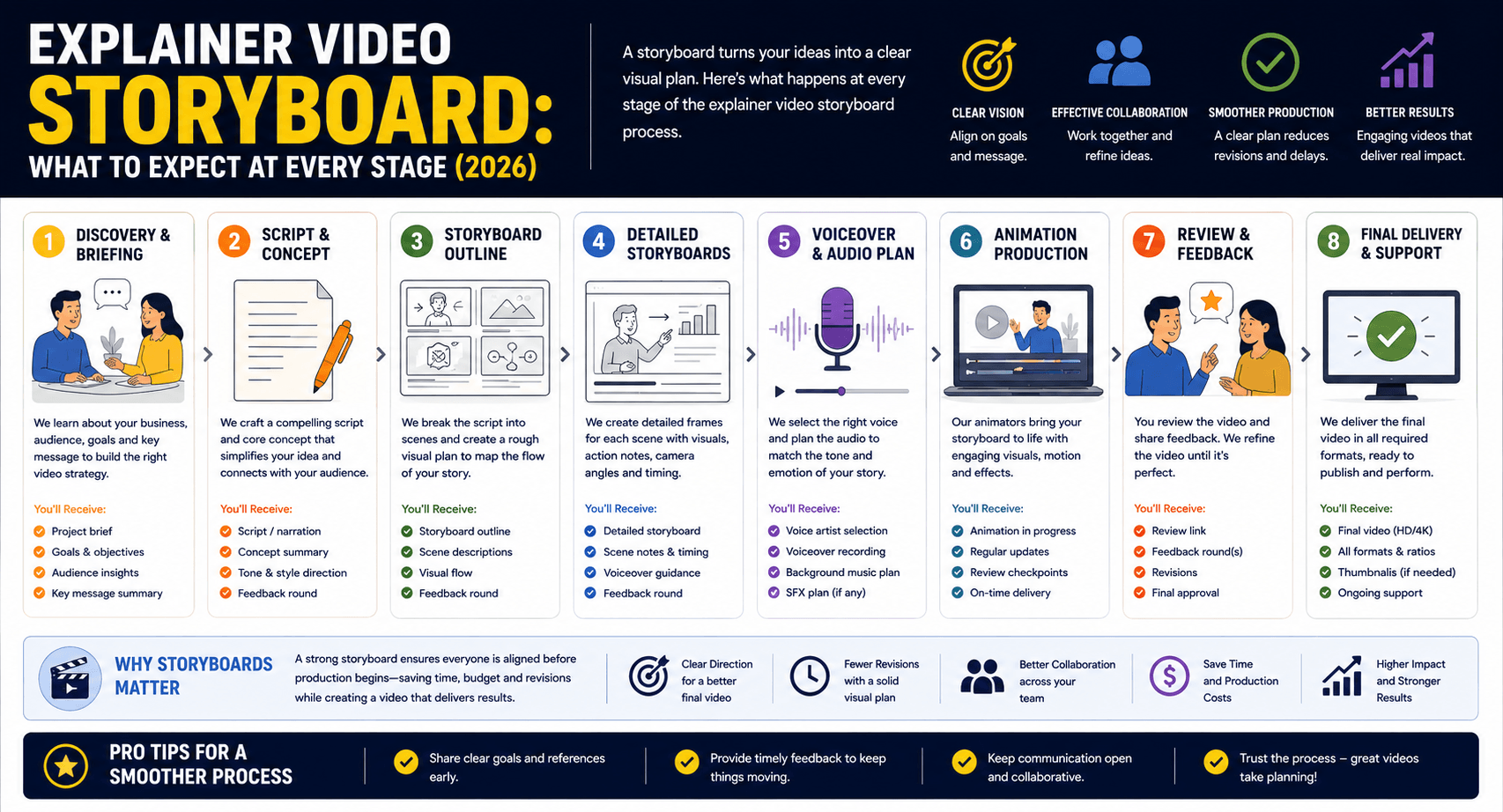
Source: Wyzowl Video Marketing Statistics 2026; industry production standards.
What Is an Explainer Video Storyboard?
An explainer video storyboard is a frame-by-frame visual document showing exactly what will appear on screen at each moment of your video, created after the script is finalised and before any animation work begins. Each frame pairs a rough visual sketch with the voiceover line it accompanies, a duration in seconds, and written instructions for the animation team.
Think of it as the architectural blueprint for your video. The script tells the production team what will be said. The storyboard tells them what will be seen, in what sequence, and for how long. Without it, there is no shared reference for the animation team to build from. Every character position, every scene transition, every graphic appearance has to be planned and agreed before animation investment begins.
For clients, the storyboard serves a different but equally important function. It is the first opportunity to see how the creative team interpreted your script visually, and the most cost-effective moment to correct any misalignments. Changes made at the storyboard stage take minutes to resolve. The same change made once animation has begun can require hours of rework and additional scope cost.
Storyboard vs Script: What Comes First
The script always comes before the storyboard. Your studio's writer translates the brief into a timed voiceover narrative, typically written at approximately 150 words per 60 seconds of video. Once you approve that script, it passes to the visual team, who read it line by line and plan a corresponding frame for every key moment. The storyboard and the script are linked documents: every frame maps to a specific voiceover line, and the total frame durations should add up to the agreed video length.
Storyboard vs Moodboard: The Confusion Most Clients Have
A moodboard is a collection of visual references assembled to establish the aesthetic direction of the video before scene planning begins. It shows colour palettes, illustration styles, character references, and tone. It is typically presented before the script is written and before any scene-level planning takes place.
A storyboard is a sequenced production document showing the actual video, scene by scene. Moodboard approval and storyboard approval are two separate sign-off gates in a professional production process. If your studio presents these as the same deliverable, that is a process flag worth raising before production continues.
The 4 Elements Inside Every Storyboard Frame
Every frame of a professional explainer video storyboard contains four elements. Understanding what each one communicates will make you a significantly more effective reviewer when the document arrives in your inbox.
The Visual Sketch
The rough illustration or diagram showing what will be visible on screen during this scene. Studio storyboards range from basic stick figures with labelled placeholders through to detailed character poses with composition guides, depending on the studio's process and the complexity of the video.
The sketch does not need to be polished. This is not the finished art style of your video; that comes at the style frame and animation stages. What matters is that the layout communicates: where characters sit relative to each other, where text appears on screen, what objects are in frame, and how much of the screen each element occupies.
Does this match what you pictured when reading the script? Is there anything visible in the frame that should not be present at this moment in the story?
The Voiceover Line
The exact script sentence or phrase from your approved voiceover copy that plays while this frame is on screen. In a correctly structured storyboard, every frame is paired with its corresponding voiceover text, and nothing from the script is left unaccounted for. This mapping is how the animation team syncs movement to speech.
If the script says "our platform connects teams across three continents" and the visual shows a single character at a desk, those are out of sync. The visual should either illustrate the voiceover directly or support it through a relevant metaphor.
Does the image illustrate or meaningfully support what is being said? Read both the voiceover line and the visual together, not separately.
Frame Timing
The duration in seconds for which this frame's visual is on screen. Experienced studios mark timing on every frame because it directly informs how much animation movement is achievable in that window. A 3-second frame can carry a character entering from the side and completing one clear action. A 1-second frame can carry only a static or minimally animated element.
Total frame durations across the entire storyboard should equal your agreed video length. If they do not add up, raise it during the review. Timing discrepancies are far easier to address at this stage than during animation.
Do the durations feel right for each scene? Are complex visual ideas given enough time, and simple scenes not over-extended?
Animation Notes and Asset List
Written instructions for the animator specifying: movement directions ("camera zooms out slowly," "character walks into frame from the right"), transition type ("cut to black," "cross-dissolve"), text and graphic appearance events ("pricing callout fades in from bottom"), and a list of visual assets required to build this scene.
The asset list is primarily an internal production document, but clients should scan it carefully for any assets the studio is expecting to receive from you: brand logo files, product screenshots, UI recordings, or specific photography.
Are any assets listed that the studio needs from your team? Delays in client-supplied assets are the most common cause of production delays after storyboard approval.
Types of Explainer Video Storyboards
Not every explainer video storyboard looks the same. The format your studio delivers depends on their internal process, the complexity of your video, and what is included in the agreed production scope.
Hand-Drawn Thumbnail Storyboard
The traditional format: pencil or digital sketches arranged in a printed or digital grid, one frame per scene. Simple, fast, and sufficient for most 60 to 90-second explainer videos using 2D animation or motion graphics.
Studios producing straightforward animated content often deliver this format because it communicates all necessary visual information without requiring the full illustration style to be applied before animation begins.
Rough outlines, labelled characters and props, basic composition guides. This is not the finished animation style.
Digital Annotated Storyboard
A digital document produced in tools such as Boords, Milanote, or Figma. More detailed scene compositions, colour direction notes, and inline annotations pointing to specific elements in each frame.
More common in studios handling technically complex, brand-sensitive, or multi-scene productions where early visual alignment with the client is critical before animation investment begins.
More visual detail than hand-drawn, with annotations explaining motion direction and transition types. Still not final art.
Animatic (Motion Storyboard)
A rough video file assembled from the storyboard frames timed to the actual voiceover recording. Rather than reviewing a static document, you watch the video play out scene by scene before any animation has been produced. Animatics give the clearest preview of pacing and narrative flow.
Not included as standard in all production budgets, but common for videos longer than 90 seconds or those with complex narrative sequences involving multiple characters, locations, or story threads.
A rough video playback of your story. The best format for reviewing timing and overall flow before animation begins.
How Many Frames Should Your Storyboard Have?
The number of frames in an explainer video storyboard follows a consistent formula based on the length of the voiceover script. Understanding this formula helps you evaluate whether the storyboard you receive is sufficiently detailed for the complexity of your video.
At a standard voiceover pace of approximately 150 words per minute, a 60-second script contains roughly 150 words. Dividing by 12 to 15 words per frame gives 10 to 12 frames for a standard 60-second video.
| Video Length | Approx Word Count | Expected Frame Range | Notes |
|---|---|---|---|
| 30 seconds | ~75 words | 5 – 7 frames | Tight brief; each frame must work hard |
| 60 seconds | ~150 words | 10 – 12 frames | Most common format; industry standard |
| 90 seconds | ~225 words | 15 – 18 frames | Suitable for multi-feature or complex briefs |
| 2 minutes | ~300 words | 20 – 25 frames | Animatic recommended at this length |
| 3 minutes | ~450 words | 30 – 38 frames | Multi-chapter structure recommended |
If your studio delivers a storyboard for a 60-second video with fewer than 8 frames, each frame is carrying too much visual territory. A single frame covering 25 to 30 words of voiceover cannot be properly illustrated in one static composition. Raise this during the review round and ask for a more granular breakdown before approving.
Transition frames, which show the moment between scenes rather than a primary scene visual, may add to the total frame count. These are typically brief and included at the studio's discretion based on the pacing requirements of the script.
Working With a Studio That Takes Storyboards Seriously?
Magic Motion Studio delivers annotated storyboards with voiceover mapping, frame timing, and full asset lists. Every project. Get a quote in 24 hours.
The Storyboard Stage: Timeline and What Your Studio Delivers
The full storyboard phase for a standard 60 to 90-second explainer video production typically runs between one and two weeks from script lock to storyboard sign-off. Here is what that timeline looks like in practice.
Script Approved
Final voiceover script locked by client. Passes to the visual team to begin scene planning.
First Draft Delivered
Studio delivers the storyboard document. All frames mapped to voiceover lines with timing and animation notes.
Client Review and Feedback
Client reviews all frames and returns consolidated, frame-specific feedback within 3 to 5 business days.
Revised Draft and Final Approval
Studio incorporates feedback and delivers revised storyboard. Client gives final sign-off. Animation begins.
How Many Revision Rounds Are Standard?
Most production agreements include one to two revision rounds at the storyboard stage. The first revision round addresses structural changes: scenes that do not match the brief, visual metaphors that do not land, character directions that need adjusting, or missing messages from the script. The second round addresses smaller refinements once those structural changes are in place.
If your production agreement does not specify revision rounds at the storyboard stage, ask before the first draft arrives. Unlimited revisions at this stage are not standard and can create timeline problems that push back the entire production schedule.
What Consolidated Feedback Means
Most professional studios specify that client feedback should be consolidated before it is submitted. This means all internal stakeholders on the client side have reviewed the storyboard, their comments have been collected by one designated contact person, any conflicting inputs have been resolved internally, and a single unified response goes back to the studio.
Studios cannot efficiently act on three separate emails from three team members providing contradictory instructions on the same frame. Designating one client-side contact who collects, prioritises, and submits all feedback is not a bureaucratic formality. It is what keeps the project on schedule and revision rounds from multiplying.
What to Look for When Reviewing Your Storyboard
Most clients review a storyboard too quickly and focus on the wrong things. They look at the illustration quality, which will not be the final art style, rather than the scene logic and message clarity. When your explainer video storyboard arrives, work through this review checklist before providing any feedback.
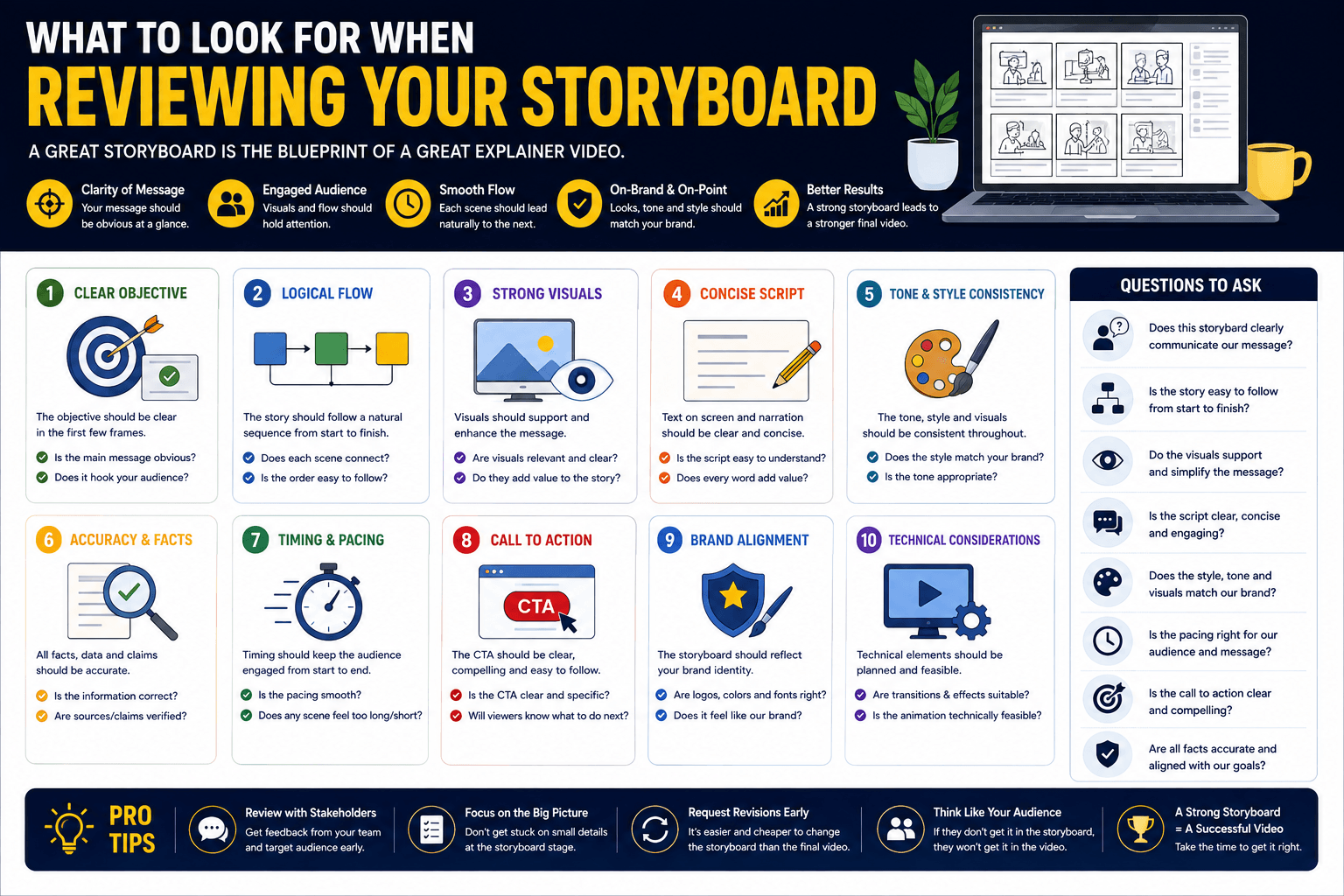
- Message clarity per frame. Does each frame communicate one clear visual idea? A frame trying to show three simultaneous concepts is a problem to flag, not accept.
- Voiceover and visual alignment. Read the voiceover line and look at the visual together. Does the image illustrate or meaningfully support what the narrator is saying at that moment?
- Brand consistency. Are character appearances, brand colours where indicated, and visual tone markers applied correctly and consistently across all frames?
- The CTA frame. Is your call to action present? Is it positioned in the final frame of the video and clearly legible within the composition?
- Pacing across the full sequence. Watch through the frames in order. Does the story flow logically? Does a first-time viewer, unfamiliar with your product, follow the narrative from problem to solution?
- Transitions between scenes. Is the movement from one scene to the next logical? Are there any jumps in the story that would disorient a viewer?
- Missing messages. Are there key points from your brief or the approved script that have no corresponding visual frame? Those are gaps to flag.
- Client-supplied assets. Scan the animation notes for any assets the studio needs from you. Identify and prepare those files during the review window to prevent production delays.
The most important principle when reviewing: evaluate the storyboard as a first-time viewer, not as someone who already knows every detail of your product. The question is not "does this look like us?" but "would a stranger understand this story, be persuaded by it, and know exactly what to do at the end?"
How to Give Feedback Your Studio Can Act On
The quality of your storyboard feedback determines how many revision rounds are needed and how well those rounds resolve the actual issues. Vague feedback creates cascading back-and-forth emails that slow the project without improving the output. Frame-specific feedback resolves problems in a single round.
- This does not feel right
- Can we make it more dynamic?
- It does not really represent our brand
- The style needs to change
- Something feels off
- Can you make it more exciting?
- Frame 4: character should hold a laptop, not a phone. We are desktop-first.
- Frame 7: replace the broadcast arrows with two characters facing each other, connected by a bridge graphic.
- Frame 9: remove red from this scene. Our brand does not use red in any context.
- Frames 11 to 12 transition too abruptly. Can an additional frame bridge these two scenes?
- Frame 14: the CTA text reads "Sign up free" but our current offer is "Start your trial." Please update.
Each actionable piece of feedback does three things: names the frame number, describes what is currently shown, and specifies what should replace or adjust it. Studios do not need to guess at what you meant, and nothing gets lost in interpretation.
Common Client Feedback Mistakes
- Approving without reading all frames. The most expensive mistake. Missing a scene direction error at this stage means catching it during animation, where fixes cost significantly more.
- Giving verbal feedback. Verbal notes have no paper trail, get misremembered, and cannot be referenced against the revised draft. All feedback should be written and frame-referenced.
- Sending multiple feedback documents from different team members separately. One consolidated document from one contact person, always.
- Commenting on illustration quality rather than scene logic. The storyboard sketch is not the final art. Focus on whether the story and composition are correct, not on line weight or colour.
- Not checking the voiceover pairing. Reading only the visuals without verifying that the voiceover line assigned to each frame matches the scene is the most common review mistake. Mismatches approved at this stage create confusing videos that require expensive re-animation.
What Explainer Video Storyboard Approval Actually Means
Storyboard approval is a formal production gate, not a casual acknowledgement. When you sign off on the storyboard, you are confirming a specific set of decisions that the animation team will build against from that point forward.
- Every scene in the video and the messages it communicates
- The narrative sequence and story flow
- Character design directions and visual style markers
- The position and wording of the CTA frame
- Scene durations and overall video pacing
- Client-supplied asset requirements
- Final colour palette (confirmed at style frame stage)
- Voiceover recording (separate deliverable)
- Music and sound design (animation and post-production)
- Finished illustration and character artwork
- Animated transitions and motion effects
- Final render and delivery formats
What Changes Cost After Storyboard Approval
Changes to scene content, character positioning, narrative sequence, or CTA wording after storyboard approval typically fall outside the original production scope. The reason is structural: animation is built frame by frame. If frame 5 changes significantly, the transition from frame 4 and the entrance state of frame 6 are both affected. The scope of rework is often broader than clients anticipate from a single change request.
This is not a punitive policy. It is a practical one. Every professional animation studio enforces this gate because animation hours are the highest-cost resource in the production process, and protecting them from preventable rework is in everyone's interest. Budget and timeline both benefit from decisions being finalised at the storyboard stage.
If you are uncertain about any scene, resolve it before signing off. The storyboard review is specifically designed as the last inexpensive moment to make structural changes to your video. Once animation begins, the conversation shifts from "how should this look" to "how much will changing it cost."

Common Explainer Video Storyboard Mistakes (and How Professional Studios Avoid Them)
These are the five most frequent problems that appear in explainer video storyboard documents, either from less experienced studios or from productions where the brief was not fully resolved before scene planning began.
Overcrowded frames
A single frame attempting to illustrate multiple simultaneous ideas: a character, three interface elements, a data chart, and a text callout, all at once. When a frame carries too many visual elements, the viewer's eye has no focal point and none of the ideas land effectively.
One frame, one idea. If multiple elements are essential in a short window, they are introduced sequentially across sub-frames or through progressive reveal animations rather than placed simultaneously. If you see an overcrowded frame in your storyboard, ask the studio to split it rather than accepting it as-is.
Literal word-matching instead of visual metaphor
Animating exactly what the voiceover line says rather than finding a more compelling visual equivalent. If the script says "we connect businesses across the globe," showing a world map with lines between cities is the literal interpretation. Showing two characters reaching across a stylised globe and completing a handshake is the metaphorical version, and it is far more memorable.
Strong storyboard artists use each visual to add meaning beyond the voiceover rather than to illustrate it word for word. The visual and the voiceover together should be richer than either alone. If every frame in your storyboard is a direct illustration of its voiceover line, ask whether any scenes can be elevated through metaphor.
Missing frame timing
Storyboard frames delivered without duration notes leave the animation team estimating how long each scene should be. Timing is not a minor detail: it determines how much movement is possible per frame, whether complex scenes have enough room to breathe, and whether the total video will land at the agreed length. Pacing problems caught here take minutes to resolve. Pacing problems caught during animation review take hours.
Every frame should carry a duration in seconds, with all frames totalling the agreed video length. If your storyboard arrives without timing notes, request them before proceeding with approval.
Vague animation instructions
"Character does something here" and "transition to next scene" are not animation instructions. Without specific direction, the animator makes choices independently, and those choices may not match the creative intent. The animation note on each frame should specify the direction of entry and exit, movement type, any text or graphic appearance events, and transition style.
Animation notes should be specific enough that any member of the production team picking up the project mid-way through could execute the frame without needing additional briefing. If notes in your storyboard are vague, ask the studio to detail them before approval.
No clear CTA frame
The final frame of the video is the conversion moment: the point where a viewer who has just understood your product takes the next step. A storyboard that trails off without a clearly composed, legible, and prominent CTA frame is missing its most commercially important element. This is a common omission when storyboard artists focus on storytelling without connecting to the marketing objective of the video.
The CTA frame should be reviewed explicitly. Check that the action you want viewers to take is clearly stated, that the CTA text matches your current offer, and that the visual composition gives it sufficient prominence relative to the other elements in the frame. If the storyboard does not include a dedicated CTA frame, request one before signing off.
Frequently Asked Questions
A storyboard for a standard 60 to 90-second explainer video typically takes 1 to 2 weeks from script approval to final client sign-off. The first draft from the studio arrives within 2 to 3 business days of script lock. Clients are then given 3 to 5 business days to return consolidated feedback. One to two revision rounds follow before the storyboard is approved and animation begins. Complex briefs with multiple scenes or characters may extend the storyboard phase to 3 weeks.
A 60-second explainer video at standard voiceover pace produces approximately 150 words of script. Dividing by 12 to 15 words per frame gives 10 to 12 storyboard frames as the expected range. If your studio delivers fewer than 8 frames for a 60-second video, each frame is covering too much visual territory to give the animation team sufficient production guidance. Ask for a more granular breakdown before approving.
Focus on: whether each frame communicates one clear idea; whether the visual matches or meaningfully supports the voiceover line paired with it; whether brand elements are correctly represented; whether the CTA is present and clearly composed in the final frame; and whether the full story sequence makes sense to someone unfamiliar with your product. Do not focus on illustration quality at this stage. The storyboard sketch is not the finished art style of your video.
Changes to scenes, narrative sequence, or visual direction after storyboard approval typically fall outside the original production scope and may require additional cost and time. Animation is built frame by frame, and a change to one scene often affects adjacent frames already in production. If you are uncertain about any element, resolve it before signing off. The storyboard review stage is specifically designed as the last inexpensive moment to make structural changes to your video.
A storyboard is a static document: a sequence of frames showing what will appear on screen at each moment, paired with voiceover lines, timing, and animation notes. An animatic is a motion version: the frames are assembled into a rough video file, timed to the actual voiceover recording, so you watch the story play out before any animation has been produced. Animatics give a much clearer sense of pacing and narrative flow, but are not included as standard in all production budgets. Ask your studio whether an animatic is in scope if your video is longer than 90 seconds or involves complex scene sequences.
For the storyboard stage itself, most studios do not require client assets upfront. However, the animation notes in each frame will list any client-supplied assets needed during production: brand logo files, product screenshots, UI recordings, or specific photography. Reviewing those asset lists during the storyboard review window and preparing those files before animation begins prevents the most common cause of production delays after sign-off. Check the final frame in particular for any product visuals or brand marks that need to come from your team. You can also learn more about measuring your video's ROI once it is live.
The Storyboard Is Where Your Video Is Won or Lost
Every structural decision about your video, every scene, every message priority, every visual metaphor, every pacing call, is made at the explainer video storyboard stage. The animation phase that follows is an execution of those decisions, not a revision of them. Clients who treat the storyboard review as a quick formality before the "real" work begins consistently end up with more revision rounds, longer timelines, and final videos that do not fully deliver against the original brief.
Clients who understand what the storyboard contains, how to read each frame against its voiceover line, how to give precise frame-specific feedback, and what approving the document actually commits them to, get better videos faster, with fewer surprises. The knowledge in this guide covers everything you need to be that kind of client.
At Magic Motion Studio, the storyboard is a client-facing alignment tool, not just an internal production document. Every frame is mapped to the approved voiceover, timed, and annotated so that what you are reviewing is a clear, actionable plan for your video, not a rough sketch for interpretation. If you are planning a professional explainer video and want to understand exactly what the production process looks like before committing, get in touch and we will walk you through it. You can also review our guide on explainer video costs in Australia to understand the full investment picture.
Let's Build Your Video the Right Way
Professional explainer video production with a structured storyboard process. Custom animation for brands across Australia and the US.
Start Your Project →