
How to Use Explainer Videos in a Sales Funnel: The Complete 2026 Guide
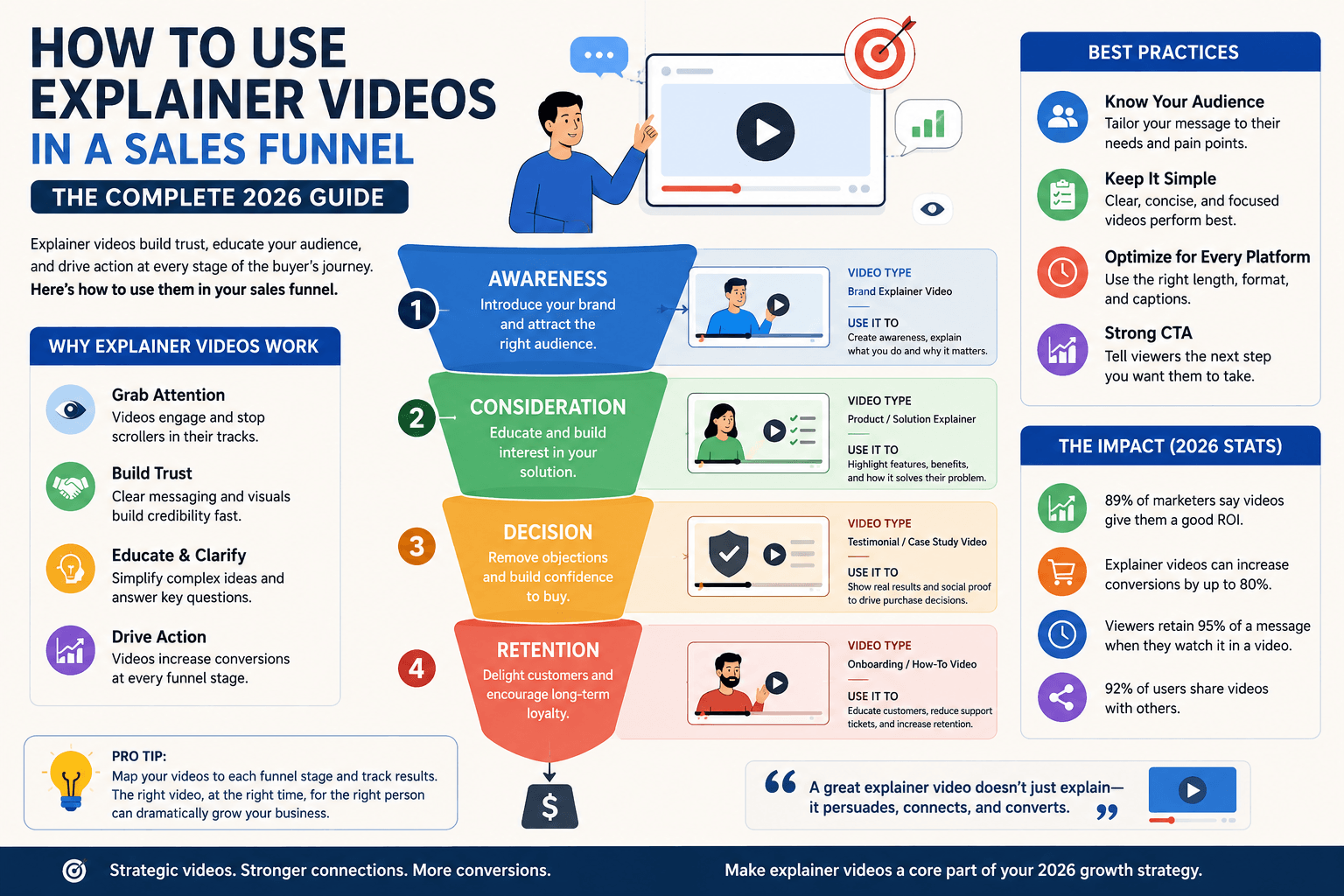
To understand how to use explainer videos in a sales funnel, match each stage to a specific video type: a problem-focused brand video for awareness (90-120 sec), a how-it-works demo for consideration (60-90 sec), and a testimonial or proof video for decision (30-60 sec). Each video needs a stage-appropriate CTA, the right hosting platform, and a clear handoff to the next stage. This guide covers all three stages, the full video type matrix, platform placement, CTA strategy, and the five mistakes that kill conversion at each stage.
Most companies that invest in an explainer video make the same mistake: they produce one video and use it everywhere. It goes on the homepage, into every email, onto every social channel, and into every sales deck. The video does moderate work at every stage and outstanding work at none of them.
The reason is straightforward. A prospect who has never heard of your brand needs something completely different from a prospect who is two days away from signing a contract. Knowing how to use explainer videos in a sales funnel means understanding that the buyer's state of mind, level of trust, and readiness to act change dramatically from the first touchpoint to the last. A single video cannot serve all three states simultaneously without compromising at least two of them.
This guide is built around the three-stage funnel model used by marketing and sales teams across SaaS, healthcare, fintech, and professional services. Each section covers the right video type, the correct length, the platform it belongs on, the CTA that matches the buyer's readiness, and a real industry example. There is also a full video type matrix, a platform placement guide, the five most common mistakes, and a sequencing framework for turning your videos into a connected campaign rather than isolated assets.
Sources: Wyzowl State of Video Marketing 2026; Unbounce landing page research; Vidyard State of Video Report.
What is a Video Sales Funnel?
Before mapping video types to stages, it helps to be precise about what a sales funnel actually is in this context, because the word gets used loosely in marketing copy in ways that dilute its practical meaning.
A video sales funnel is a structured sequence of videos, each assigned to a specific stage of the buyer journey, designed to move prospects from first awareness of a problem through to a purchase decision. Unlike a single brand video, a funnel treats each stage as a distinct conversion problem with its own message, format, length, and call to action.
The funnel narrows as it deepens: a large number of prospects enter at the awareness stage, a smaller group moves into consideration, and a smaller group still reaches the decision stage. The job of each video is to advance the right prospects to the next stage, not to serve every viewer simultaneously.
The three-stage model maps directly to the buyer's psychological state at each point in the journey:
Awareness (ToFu)
The prospect has a problem but does not yet know your brand or your solution exists. They are looking for information, not vendors.
Consideration (MoFu)
The prospect knows solutions exist and is actively comparing options. They want to understand how your approach differs from alternatives.
Decision (BoFu)
The prospect is ready to commit. They need one final reason to choose you over everyone else and confirmation that the decision is low-risk.
Top of Funnel (Awareness): The Problem Video
At the awareness stage, your prospect does not know you exist. They are searching Google, scrolling social feeds, or reading industry blogs trying to understand a problem they are experiencing. The moment you lead with your product or your pricing, you lose them. They are not ready for that conversation.
The awareness video has one job: make the prospect feel understood. It names their problem accurately, validates that the problem is worth solving, and introduces the idea that a solution category exists without yet naming yours specifically. When done correctly, it creates the first deposit of trust that every subsequent touchpoint builds on.
What to Say at the Awareness Stage
Open with the problem, not your brand name. The first 10 seconds should describe a situation the target viewer recognises immediately. A SaaS company targeting operations managers might open with: "If your team is still manually pulling reports from three different tools every Friday, you already know the problem." That opening costs nothing and earns immediate attention from the right viewer.
After establishing the problem, introduce the idea of a solution category. Not your specific product. The solution concept. "There is a better way to automate this workflow" is the right level of specificity at ToFu. Brand names and feature lists belong in stage two.
Close with a soft CTA that keeps the prospect in the funnel without demanding commitment. "See how it works" or "Read the full guide" sends them to a blog post or a how-it-works landing page, not a pricing or contact page.
Style and Tone for Awareness Videos
Animated explainer videos are the most effective format for ToFu content because they can illustrate abstract problems visually without requiring live footage or a physical product demonstration. A 2D character animation showing a frustrated team member drowning in spreadsheets communicates the pain point in seconds. The animation style should feel approachable and on-brand without veering into cartoonish territory that undercuts the seriousness of the problem being described.
Tone should be empathetic and educational. Zero sales pressure. Viewers at this stage are extremely sensitive to being sold to before they have been helped. According to research from HubSpot, 96% of people who encounter a brand for the first time want educational content before commercial content. The awareness video that earns trust earns the right to the next conversation.
Industry Example: SaaS Startup
A project management SaaS company targeting small agencies produces a 105-second animated video showing how three common tools (email, spreadsheet, task manager) create a communication gap that causes projects to run late. The video never mentions the company's product. It ends with a line card: "There is a better way to manage projects" and a link to a blog post titled "Why Agency Projects Fail (and How to Fix It)." That blog post embeds the consideration-stage video.
Middle of Funnel (Consideration): The How-It-Works Video
At the consideration stage, your prospect knows their problem has a solution and is actively researching which solution to choose. This is where your brand enters the conversation directly. The consideration video is your clearest opportunity to differentiate, and most companies waste it by producing a generic product overview that could describe any competitor in the space.
The strongest consideration videos answer the three questions every evaluating buyer is silently asking: What exactly does this do? How is this different from what I am already using? What does the experience of working with this company actually look like?
What to Say at the Consideration Stage
Open with the specific problem your product solves, then immediately demonstrate the solution in action. This is not the place for abstract metaphors or brand storytelling. Show the product working. Show the process. Show a before-and-after. If you are a service business rather than a software product, walk through your process step by step so the prospect can visualise what working with you involves.
Specificity is the differentiator at this stage. If your explainer video production process takes six defined steps, name all six. If your animation style is distinct, demonstrate it. Vague language like "we create compelling content" does nothing for a buyer who is comparing three studios side by side. Concrete process detail builds confidence in a way that superlatives never can.
Where to Place the Consideration Video
The consideration video belongs on your primary service or product landing page, embedded above the fold. According to Unbounce data, landing pages with video above the fold convert up to 80% better than text-only equivalents. Set it to autoplay muted with captions enabled so it begins playing immediately without requiring a click.
It also belongs in your email nurture sequence, typically in the second or third email after a prospect subscribes or makes an initial enquiry. By this point the prospect has shown enough interest to open multiple emails. A video thumbnail in email body with a subject line containing the word "video" increases open rates by up to 19%, according to Vidyard research. Link the thumbnail to a dedicated landing page rather than directly to YouTube so you retain analytics and retargeting data.
Industry Example: Animation Studio
A video production studio produces an 80-second animated walkthrough showing its six-stage production process: brief, script, storyboard, voiceover, animation, final delivery. Each stage is shown with specific timeline milestones and a sample output. The video ends with: "Ready to see this for your brand? Book a free strategy call." This CTA is appropriate at MoFu because the prospect already understands what the studio does. They are being asked to take a low-risk next step, not a purchase decision.
Bottom of Funnel (Decision): The Proof Video
At the decision stage, the prospect has done their research. They have a shortlist. They know what they want. The remaining barrier is not information; it is risk. They are asking themselves: what if this does not work? What if I make the wrong call?
The decision video's job is to eliminate that final hesitation through proof. Social validation, documented results, and a clear picture of what the first step looks like are the three most reliable tools for closing a prospect who is already sold on the category but unsure about committing to you specifically.
What to Say at the Decision Stage
Let someone else do the talking. A client testimonial video, even 30 to 45 seconds of a real client describing a specific result, outperforms any amount of self-promotion at this stage because it removes the single most common objection: "Of course they say it works; they're trying to sell it to me." A peer saying it works is a fundamentally different signal.
If a testimonial video is not available, a case study walkthrough showing a defined before-and-after serves the same function. The key is specificity: named client, named problem, measurable result. "Our conversion rate increased 34% in the first 60 days" is persuasive. "We saw great results" is not.
End with a direct CTA matched to the urgency the buyer is already feeling. "Start your project today," "Book your strategy call," or "Get your custom quote" are all appropriate. Soft CTAs like "learn more" are a mismatch at the decision stage and often cause last-minute drop-off from buyers who were ready to commit.
Industry Example: Fintech or Professional Services
A fintech company sends a proposal email that includes a 45-second video of a CFO from a similar company describing how the product reduced their monthly reconciliation time by 60%. The video thumbnail shows the client's face and company logo. The email CTA is: "Book your implementation call." The specificity of the testimonial (real person, real role, real metric) removes the primary objection and makes the next step feel low-risk.
The Complete Video Type Matrix
The following matrix maps all six core video types to their optimal funnel stage, platform, length, and CTA approach. Use this as a planning reference when scoping your video strategy.
| Funnel Stage | Video Type | Length | Primary Platform | CTA Approach |
|---|---|---|---|---|
| Awareness | Brand / Problem Video | 90-120 sec | YouTube, Social Ads | Soft — blog post or resource |
| Awareness | Animated Explainer | 90-120 sec | Blog embed, Display Ads | Soft — "See how it works" |
| Consideration | How-It-Works Video | 60-90 sec | Service Pages, Email #2-3 | Medium — "Book a call" |
| Consideration | Product Demo | 60-90 sec | Landing Pages, Retargeting | Medium — "See pricing" |
| Decision | Client Testimonial | 30-45 sec | Proposal Email, Contact Page | Direct — "Start your project" |
| Decision | Case Study Video | 45-60 sec | Sales Deck, Checkout Page | Direct — "Get your quote" |
Platform Placement Guide: Where Each Video Belongs
The platform a video lives on is as important as the video itself. The same 90-second brand video that performs well as a YouTube pre-roll will underperform embedded in a proposal email, because the intent of someone watching YouTube is different from someone reading a sales proposal. Place each video where the buyer's intent matches what the video is designed to do.
YouTube
Best for ToFu and MoFu content. YouTube is a search engine where buyers actively look for answers to specific problems. Optimise titles and descriptions with problem-focused keywords. Pre-roll ads on YouTube reach cold audiences effectively at the awareness stage. Enable end screens with links to your service page for MoFu follow-through.
- Brand and problem videos (ToFu)
- How-it-works explainers (MoFu)
- Industry education content (ToFu)
Best for B2B ToFu and MoFu content targeting specific job titles, industries, or company sizes. LinkedIn video posts in the feed perform best at 60 to 90 seconds with captions (80% of LinkedIn video is watched without sound). Sponsored InMail with a video thumbnail link is effective for warm retargeting of profile visitors.
- Problem-focused explainers (ToFu)
- Case study previews (MoFu)
- Thought leadership clips (ToFu)
Email Sequences
Best for MoFu and BoFu. Embed a static thumbnail with a play button overlay linked to a landing page. Never embed actual video files in email. Include the word "video" in the subject line for a measurable open rate lift. Position the how-it-works video in email 2 or 3 of a nurture sequence. Reserve testimonial and proof videos for later emails when the prospect is closer to a decision.
- How-it-works demos (MoFu, email 2-3)
- Client testimonials (BoFu, email 4-6)
- Case study walkthroughs (BoFu)
Landing Pages
Best for MoFu and BoFu conversion. Place the video above the fold, visible without scrolling. Set autoplay muted with captions. Host on Wistia or Vimeo for page-level analytics that show exactly how far visitors watch. A well-placed consideration video on a service landing page produces the most measurable short-term conversion lift of any placement. Learn more about measuring explainer video ROI from these placements.
- How-it-works explainers (MoFu, above fold)
- Testimonials (BoFu, near CTA button)
- Product demos (MoFu, feature sections)
Ready to build your video funnel?
We produce stage-specific explainer videos for awareness, consideration, and decision. See our full production packages.
CTA Strategy: Why the Wrong Call to Action Kills Conversions
A correctly produced video with the wrong CTA is a conversion problem disguised as a production problem. The message, the length, and the visual quality can all be right, and the video will still underperform if the action it asks the viewer to take does not match where the viewer is in the buying journey.
CTA friction must match buyer readiness. At ToFu, high friction CTAs (contact form, book a call) create resistance because the viewer has not yet decided they need your solution. At BoFu, low friction CTAs (learn more, download a guide) leave conversion on the table because the viewer is already ready to commit. Match the ask to the stage.
Awareness Stage CTAs
Keep the ask minimal. The viewer is not ready to be a lead. Send them to a piece of content that continues the educational journey: a blog post, a free guide, a resource hub, or the next video in the funnel sequence. "See how brands are solving this" is a better CTA than "Book a free consultation" at this stage, even if a free consultation involves zero commitment. The phrasing creates perceived pressure that a cold audience will not tolerate.
Consideration Stage CTAs
Ask for a micro-commitment. "Schedule a 20-minute call," "request a sample," or "see the full process" are appropriately sized asks for a buyer who is evaluating options. They require genuine intent without demanding a purchase decision. The goal is to qualify the buyer and move the conversation to a direct channel where your team can accelerate the relationship.
Decision Stage CTAs
Be direct and specific. The prospect is ready. Vague language at this stage introduces hesitation where none existed. "Start your project today," "get your custom quote," and "book your strategy call" all work because they describe a concrete first step rather than an ambiguous next phase. If you have a time-limited component (project slots, intake capacity), it is appropriate to mention it here as an honest urgency signal.
How to Sequence Your Videos Into a Connected Campaign
Individual stage videos are effective. Sequenced videos that hand off from one stage to the next are significantly more effective because they create a guided journey that mirrors the natural progression of the buying decision, rather than leaving the prospect to navigate between disconnected assets.
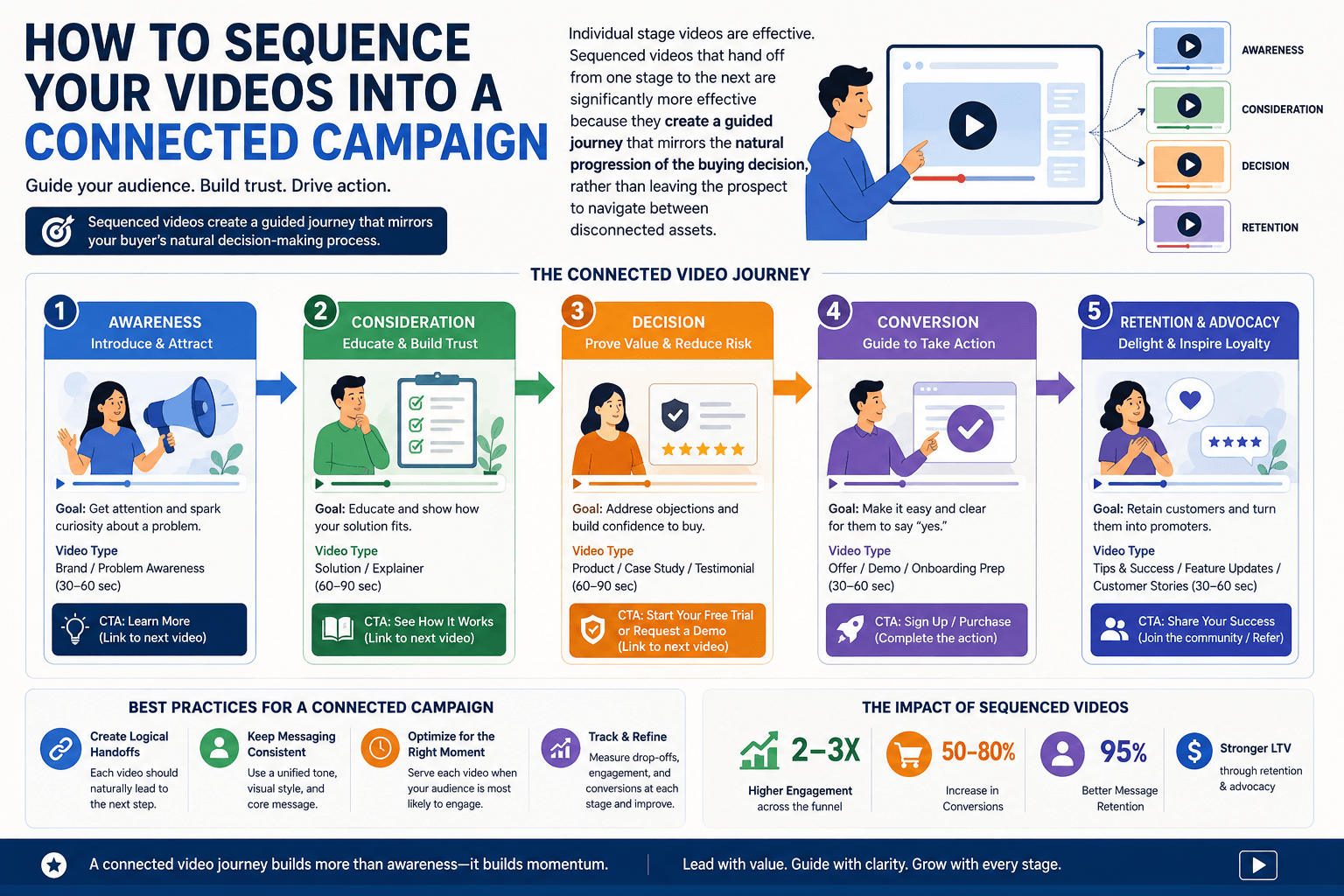
The sequencing model works through a combination of retargeting pixels and email automation:
Publish the Awareness Video
Run it as a YouTube pre-roll ad or a social feed video targeted at your cold audience segment. Install a retargeting pixel on the video page or use YouTube's audience builder to create a custom audience of viewers who watched at least 50% of the video.
Retarget Engaged Viewers with the Consideration Video
Run the how-it-works video as a retargeting ad exclusively to viewers who engaged with the awareness video. This audience is warm and pre-qualified. The retargeting ad can be shorter and more direct because the viewer already has context. This is also the point to route engaged viewers to a service landing page with the consideration video embedded above the fold.
Capture and Nurture via Email
Once the prospect has submitted a form or made an enquiry, the email sequence begins. Email 1 confirms receipt. Email 2 or 3 embeds the how-it-works video thumbnail. Emails 4 and 5 share a client testimonial video and a case study. Review the storyboard process used to build these videos for each stage.
Close with a Decision-Stage Video at the Proposal Stage
Include the testimonial or case study video directly in the proposal email or on the proposal page. At this point the prospect is actively comparing quotes. A 40-second client testimonial naming a specific result is one of the most effective closing tools available, regardless of industry.
5 Mistakes That Kill Sales Funnel Videos
Understanding how to use explainer videos in a sales funnel is only half the equation. The other half is avoiding the specific execution errors that neutralise well-produced content at every stage. These are the five most common mistakes across every industry and funnel type.
- Mistake 1
Using One Video for All Three Stages
A 90-second brand explainer on your homepage may work well for cold visitors. The same video sent in a proposal email to a buyer who is already comparing quotes creates confusion and slows the decision down. Each stage needs its own video with its own job.
The FixStart with three videos: one per stage. Even a minimal BoFu video (a 30-second founder or team message filmed on a phone) is more effective at decision stage than your full brand explainer.
- Mistake 2
Leading with Product Features at the Awareness Stage
Cold audiences do not yet believe they need what you sell. Opening a ToFu video with product features, integrations, or pricing creates an immediate mismatch between what the viewer needs (education and validation) and what you are providing (sales content). The result is a high drop-off rate within the first 10 seconds.
The FixOpen every ToFu video with the problem, not the product. Spend the first 60% of the video on the problem landscape. Reserve the last 40% for the solution concept.
- Mistake 3
Making the Bottom-of-Funnel Video Too Long
A two-minute brand story sent to a buyer who has already watched your brand story twice and is ready to sign a contract is a conversion friction point, not a sales tool. BoFu viewers have limited patience for content they have already processed. They need proof and a next step, not a full narrative.
The FixCap BoFu videos at 60 seconds. If your testimonial runs longer, edit it. One strong, specific claim delivered in 30 seconds outperforms a five-minute testimonial at this stage.
- Mistake 4
No CTA or a Mismatched CTA
Videos without a clear end CTA leave the viewer with no next step. Videos with a CTA that does not match the buyer's readiness create friction that pushes otherwise warm prospects out of the funnel. Both outcomes are conversion losses that do not show up as obvious problems in view count analytics.
The FixEvery video needs one CTA, calibrated to the stage. Soft at ToFu, medium at MoFu, direct at BoFu. Test CTA language the same way you would test ad copy — small wording changes produce measurable conversion differences.
- Mistake 5
Hosting All Videos on Social Platforms Only
YouTube and Instagram are distribution channels, not analytics tools. When your only hosting environment is social, you lose page-level watch time data, you cannot retarget based on viewing behaviour on your own domain, and you have no control over what plays after your video ends. A YouTube autoplay recommendation to a competitor's channel at the end of your consideration video is a conversion problem.
The FixHost consideration and decision-stage videos on Wistia or Vimeo for your service pages. Use social platforms for distribution of awareness content only. This gives you clean analytics and full control over the post-video experience.
Industry Use Cases: How Different Sectors Apply the Funnel
The three-stage framework for how to use explainer videos in a sales funnel applies universally, but the specific video type, messaging approach, and distribution channel shift by industry. Here is how three distinct sectors apply the model.
SaaS and Software Products
SaaS funnels benefit from product-led video at every stage. The ToFu video shows the category problem (manual workflows, data silos, reporting gaps). The MoFu video is a product demo showing the interface in motion with a clear before-and-after of a specific workflow. The BoFu video is a customer story from a recognisable company in the same vertical. SaaS companies with a free trial or freemium model can add a fourth video: an onboarding explainer that reduces churn by helping new users reach their first value moment faster.
Healthcare and Medical Services
Healthcare funnels are sensitivity-driven. ToFu content educates on conditions, treatment options, or service categories without creating alarm. MoFu content explains what a specific procedure, service, or care pathway involves, addressing common fears about the experience. BoFu content features patient stories or practitioner credentials that build the trust required for a healthcare decision. Length at every stage skews slightly longer than other industries because the decision carries higher perceived personal risk.
Professional Services and Creative Agencies
For studios, agencies, and professional service firms, the funnel mirrors the client journey directly. The ToFu video addresses why the category of service matters (why animated video outperforms static content, for example). The MoFu video walks through the studio's specific production process step by step, showing what a client actually experiences. The BoFu video is a client testimonial paired with a finished work sample from a similar industry or use case. This combination allows the prospect to project themselves into the result before committing.
Frequently Asked Questions
What type of explainer video works best at the top of the sales funnel?
At the top of the funnel, the most effective explainer video is a problem-focused brand video that introduces the pain point your audience is experiencing without immediately pitching your product. Animated explainer videos work particularly well here because they can simplify abstract problems visually and hold attention on social feeds. Ideal length is 90 to 120 seconds. The CTA should be soft, directing viewers to a blog post, a free resource, or a how-it-works page rather than a pricing or contact page.
How long should a bottom-of-funnel explainer video be?
Bottom-of-funnel explainer videos should be between 30 and 60 seconds. At this stage, the buyer is already informed and close to a decision. A long video risks losing them right before conversion. The content should focus on proof: a client testimonial, a specific result, or a brief walkthrough of what the first step of working with you looks like. The CTA must be direct, along the lines of "start your project," "book your strategy call," or "get your quote today."
Can one explainer video work across all stages of the sales funnel?
Technically yes, but strategically no. A single explainer video can be placed across multiple channels, but it will underperform at stages where its message does not match the buyer's state of mind. A prospect who has never heard of you needs education, not a pricing CTA. A prospect ready to buy does not need a two-minute brand story. Stage-specific videos consistently outperform single-video strategies in conversion rate because the message, length, and CTA are calibrated to what the buyer needs at that exact moment.
Where should I place an explainer video on a landing page?
Place the explainer video above the fold on the landing page, visible without scrolling, positioned beside or below the primary headline. Set it to autoplay muted with captions enabled so it plays immediately without requiring the visitor to click. According to Unbounce data, landing pages with video above the fold convert up to 80% better than text-only equivalents. Avoid placing video only at the bottom of long pages; most visitors never scroll that far. For more on measuring the impact of this placement, see our guide on how to measure explainer video ROI.
How do I use explainer videos in email marketing?
Embed a thumbnail image with a play button overlay in the email body, linked to a dedicated landing page where the video plays. Most email clients do not support inline video playback. Use the word "video" in the subject line, as research from Vidyard shows this increases open rates by up to 19%. In nurture sequences, place a how-it-works video in email 2 or 3 of the sequence, once the reader has established basic familiarity with your brand. Reserve testimonial and case study videos for later emails when the prospect is closer to a decision.
How many explainer videos do I need for a complete sales funnel?
The most practical way to understand how to use explainer videos in a sales funnel is to start with three videos: one per stage. A ToFu brand or problem video (90-120 seconds), a MoFu how-it-works or product demo video (60-90 seconds), and a BoFu testimonial or proof video (30-60 seconds). Brands with higher traffic volumes or multiple audience segments benefit from additional variations, such as separate ToFu videos for different ad audiences or separate BoFu videos for different verticals. Start with three and expand based on which stage is generating the most drop-off.
Build your video funnel with us
We produce stage-specific explainer videos for awareness, consideration, and decision, each with the right length, format, and CTA for maximum conversion at every stage of your funnel.
See Production Packages →Free strategy call included. No obligation.
Related Guides
Further reading for teams implementing how to use explainer videos in a sales funnel and measuring the results:
- What Is an Explainer Video? Types, Styles and Examples
- What Is 2D Animation? Complete Guide for Businesses
- 2D Animation Studio: Character Animation & Motion Graphics
- What Are Motion Graphics? Guide for Businesses
- Explainer Video Examples That Convert: 12 Real-World Results
- How to Measure Explainer Video ROI
- Explainer Video Storyboard: How It Works and What to Expect
- Explainer Video Cost in the USA: 2026 Pricing Guide