
Toon Boom Harmony vs Clip Studio Paint
One is the software behind Rick and Morty, The Simpsons, and Disney Television Animation. The other is the drawing tool used by Toei Animation and the majority of professional manga artists. Which one belongs in your anime production pipeline?
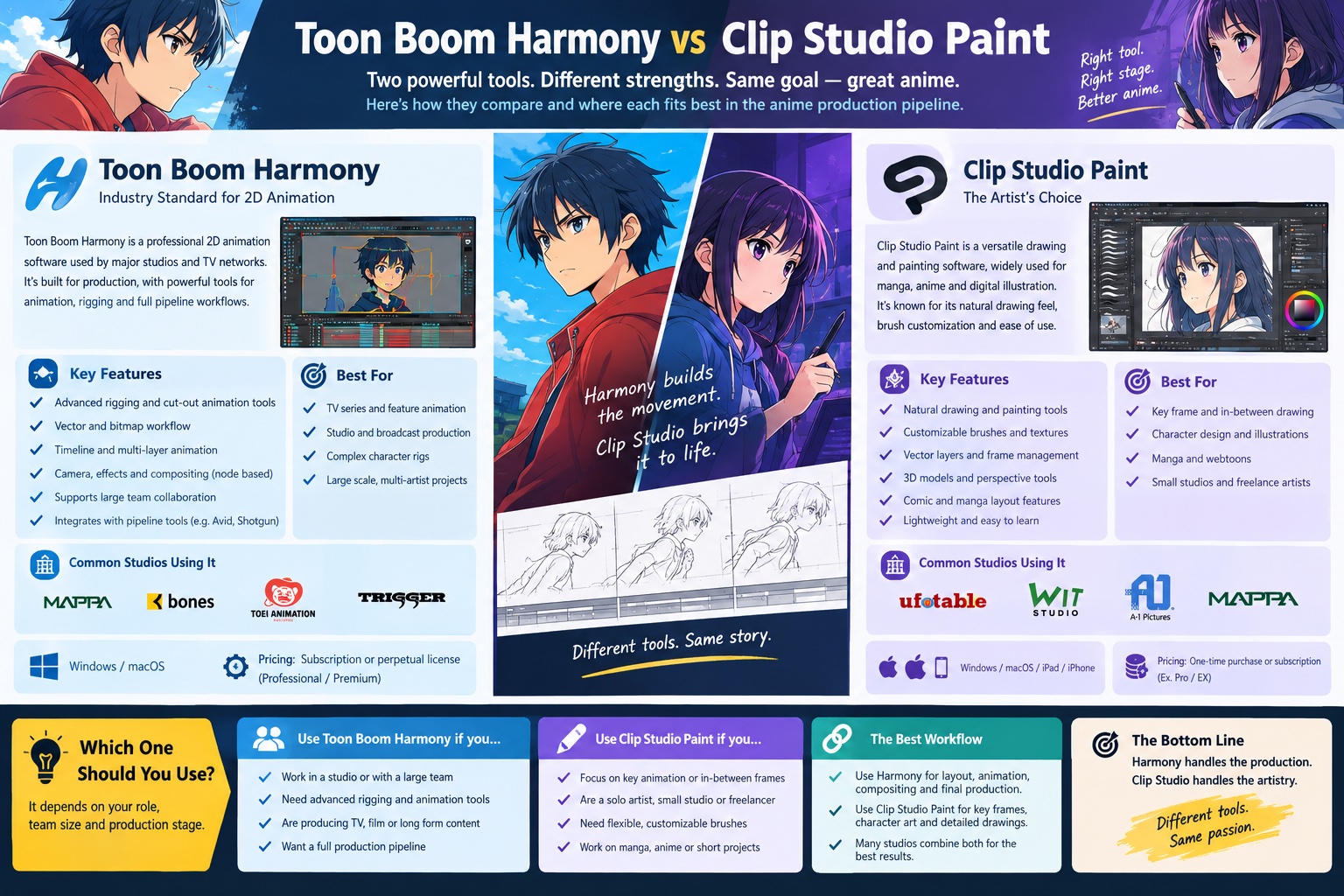
The Question Every Anime Creator Asks Eventually
The toon boom harmony vs clip studio paint debate comes up the moment an animator moves from drawing characters to actually producing a finished animation. Both tools appear constantly in conversations about anime-style production. Both are used by professional studios. Both are capable of producing high-quality frame-by-frame animation. And yet they are fundamentally different types of software solving different problems at different scales of production.
Most comparison articles treat this as a feature checklist. They count the tools in each menu, note that Harmony costs more, and declare a winner. That misses the actual question, which is not which software has more features but which one is the right tool for the specific kind of anime production you are trying to build.
This page answers that question using verified data from the studios that actually use both tools, a phase-by-phase production comparison, and a clear use-case framework so you can identify which one belongs in your workflow before you spend time learning either.
Magic Motion Studio is a Toon Boom Harmony studio. That gives us direct production experience with Harmony's pipeline. We also work with artists who use Clip Studio Paint EX for character design and key animation drawing. The comparison below reflects how both tools perform in a real anime-style production environment, not a spec sheet.
What Each Tool Actually Is
Before comparing features, it is worth being precise about what category each application belongs to. This distinction matters more than any individual feature comparison.
Harmony is a complete 2D animation production application. It handles drawing, rigging, frame-by-frame animation, cut-out puppet animation, camera work, effects, and compositing within a single environment. It is designed to support an entire studio's production pipeline, from a single freelancer to a server-connected team of 50 animators working on the same project simultaneously.
It comes in three tiers. Harmony Essentials covers basic drawing, painting, and animation tools. Harmony Advanced adds full traditional and paperless animation workflows plus simple cut-out animation. Harmony Premium, the tier used by most professional anime-style studios, adds sophisticated bone-deformation cut-out rigs, inverse kinematics, and unlimited special effects compositing.
Clip Studio Paint is primarily a drawing and illustration application that grew out of the manga production workflow. Its EX tier adds full animation capabilities: an unlimited-frame timeline, onion skinning, frame management, light table, and frame-by-frame drawing tools. It does not have a rigging system, a compositing network, or pipeline server integration.
What it does have is one of the best drawing experiences of any digital application, a massive library of community brushes, strong vector and raster tools, and a pricing model significantly more accessible than Harmony. It is available as a one-time perpetual licence for Windows and Mac, or as a monthly or annual subscription across multiple platforms including iPad.
Head-to-Head: 8 Key Comparison Dimensions
Breaking down toon boom harmony vs clip studio paint across the specific capabilities that matter for anime-style production gives a clearer picture than any overall rating can provide.
The Full Feature Comparison
| Feature | Toon Boom Harmony | Clip Studio Paint EX |
|---|---|---|
| Frame-by-frame animation | Full support | Full support (unlimited frames in EX) |
| Cut-out rigging | Full (bone deformation + IK) | Not available |
| Node-based compositing | Full network compositing | Not available |
| Drawing and brush engine | Professional, functional | Industry-leading drawing feel |
| Onion skinning | Yes | Yes |
| Camera movement controls | Full camera system | Not available |
| Effects and particles | Full (Premium tier) | Basic layer effects only |
| Manga and comic tools | Not available | Industry-leading |
| 3D integration | 3D model import and reference | Basic 3D model reference only |
| Team and server collaboration | Harmony Server pipeline | No server collaboration |
| iPad and mobile support | Not available | Full iOS, iPadOS, Android |
| Perpetual licence option | Subscription only | Yes (Windows and Mac) |
| Storyboard integration | Storyboard Pro pipeline | Basic storyboard panel support |
| Broadcast format export | Full broadcast output | MP4, GIF, image sequences |
| Community and learning resources | Official Toon Boom Learn platform | Massive community, CLIP STUDIO TIPS |
Where Toon Boom Harmony Wins
Harmony handles drawing, rigging, animation, camera, effects, and compositing in a single application. A studio can produce a complete finished episode without touching any other software. This is the capability that makes it the professional broadcast standard, and it has no equivalent in Clip Studio Paint.
For anime-style productions with recurring characters across multiple scenes or episodes, rigged cut-out animation is the primary efficiency tool. Building a character rig once in Harmony means every animator on the team can re-use it without redrawing the character from scratch on every frame. This is not possible in Clip Studio Paint at any tier.
Harmony's node-based compositing network allows per-layer effects, lighting passes, atmospheric depth, and particle systems within the animation itself. What Ufotable achieves by running a parallel After Effects and Maya pipeline, Harmony studios can achieve within a single Harmony project. The compositing system is the most underappreciated capability in the tool.
Harmony Server allows multiple animators to work on the same production simultaneously with shared assets, centralised rig libraries, and scene management. This is what distinguishes a studio tool from a personal tool. Clip Studio Paint has no equivalent multi-user infrastructure.
Where Clip Studio Paint EX Wins
Clip Studio Paint EX has the best pen-on-screen drawing feel of any digital illustration or animation tool available. Its brush engine, line variation, stabilisation options, and response to Wacom and Apple Pencil pressure are consistently rated above Harmony's drawing tools by working animators. For character design sheets and key animation drawing, CSP EX is the superior tool.
The perpetual licence option for CSP EX makes it one of the most cost-effective professional drawing tools available. Independent creators who want to produce short anime content without committing to a professional subscription can own a fully functional copy outright. The subscription tier adds cross-device flexibility including iPad production.
No other animation tool matches Clip Studio Paint's manga and comics workflow. For creators producing webtoons, manga, and short animation in the same application, or studios whose output spans both manga and anime simultaneously, CSP EX is the only tool that handles both workflows at a professional level.
Need an Anime Studio That Handles the Full Pipeline?
Magic Motion Studio is a Toon Boom Harmony studio producing anime-style animation for brands, games, and independent projects.
Which One Are You? Three Use Cases with a Clear Answer
The toon boom harmony vs clip studio paint decision becomes straightforward once you identify which production context you are actually working in. Here are the three most common scenarios for anime and anime-style creators.
A solo creator or small team making a 2 to 5 minute fully hand-drawn anime short. Tight budget. Frame-by-frame only. No need for rigging. Possibly releasing on YouTube or a crowdfunding campaign.
Use Clip Studio Paint EXA production studio, agency, or brand producing anime-style content at series scale, with recurring characters, multi-scene episodes, or broadcast delivery requirements. Team of 2 or more working together.
Use Toon Boom HarmonyA manga artist or webtoon creator adding short animated clips, motion comics, or looping animations to their work. The drawing workflow is primary; animation is supplementary.
Use Clip Studio Paint EXCan You Use Both? The Hybrid Workflow
Many working animators and studios use Clip Studio Paint EX and Toon Boom Harmony as complementary tools rather than alternatives. This approach takes advantage of what each tool genuinely does best.
The CSP + Harmony Production Flow
In this hybrid approach, Clip Studio Paint EX handles the pre-production drawing stages where its brush engine and illustration tools shine. Character design sheets, colour model references, and background rough sketches are produced in CSP EX and then imported as reference assets into Harmony where the actual production animation takes place.
Some key animators who trained on CSP EX also use it to draw key frames and rough animation passes, which are then cleaned up and assembled inside Harmony. This preserves the drawing experience those animators are most comfortable with while keeping the production pipeline in Harmony where compositing and rigging are available.
What About TVPaint?
TVPaint Animation is the third significant option in this category and is worth naming directly. It is a French professional animation application used by WIT Studio, Cartoon Saloon, and Studio La Cachette. Like Clip Studio Paint EX, it is a frame-by-frame-only tool with no rigging system. Unlike CSP EX, it is built exclusively for animation production and includes a more complete suite of animation-specific tools including a full storyboard mode and professional-grade light table. For independent or small-studio anime productions committed entirely to frame-by-frame traditional animation, TVPaint is a serious third contender worth evaluating alongside Clip Studio Paint EX. See our guide on what software anime studios use for a full breakdown of where TVPaint fits in the professional landscape.
Magic Motion Studio's Verdict
The toon boom harmony vs clip studio paint comparison has a clean answer when framed around production scale and intent.
Clip Studio Paint EX is the better drawing tool. Its brush engine, illustration workflow, and manga tools are genuinely superior to Harmony's drawing experience. For independent creators producing short frame-by-frame anime, for character designers producing reference sheets, and for anyone whose workflow crosses between manga illustration and animation, CSP EX is the right tool and represents exceptional value.
Toon Boom Harmony is the better production tool. It is not a comparison of features. Harmony is a different category of application. If your production requires rigged animation, compositing, team pipeline infrastructure, or broadcast-quality delivery, Clip Studio Paint EX cannot fulfil that role at any tier. Harmony was built for exactly those requirements and is the tool professional studios reach for because it is built around how productions actually run.
At Magic Motion Studio, we produce anime-style work in Toon Boom Harmony and use Clip Studio Paint alongside it for character design and illustration work. In our experience, the two tools complement each other more than they compete.
For a broader view of every tool in a professional anime studio's arsenal, see our full guide on what software anime studios use. If you are starting a production and want to understand what the pipeline looks like from concept through delivery, our guide on how to make an anime pilot walks through every phase in detail.
If you are evaluating studios to produce your anime-style project rather than building it yourself, our overview of the best anime animation studios in the USA covers what separates pipeline-capable studios from independent creators. When you are ready to brief a studio, our guide on how to brief an anime studio covers exactly what information you need to prepare. For commissioning, see how to commission anime animation for the full process from enquiry to delivery.
And if the fundamental question is not which software but what kind of animation your project requires, what is frame-by-frame animation explains the technique at the core of both tools, and what is anime animation covers what distinguishes anime as a production form from other animation styles.
Frequently Asked Questions
Is Toon Boom Harmony better than Clip Studio Paint for anime?
For professional anime production at studio scale, Toon Boom Harmony is the stronger choice. It supports cut-out rigging, node-based compositing, and a full production pipeline that Clip Studio Paint cannot match. Clip Studio Paint EX is a better drawing and illustration tool and works well for independent frame-by-frame anime shorts where pipeline integration is not required.
Can you make anime in Clip Studio Paint EX?
Yes. Clip Studio Paint EX supports unlimited frame animation, onion skinning, a timeline, and frame-by-frame drawing tools sufficient for short anime projects. It is not a complete production suite: it has no rigging system, no node compositing, and no pipeline server integration. For a short independent anime project or webtoon animation, it is a capable and affordable option.
What is the difference between Harmony Essentials, Advanced, and Premium?
Harmony Essentials covers fundamental drawing, painting, and basic animation tools. Harmony Advanced adds full traditional and paperless animation workflows plus simple cut-out animation. Harmony Premium adds sophisticated bone-deformation cut-out rigs, inverse kinematics, and unlimited special effects compositing for professional studio pipelines. Most professional anime-style studios use Harmony Advanced or Premium.
Does Clip Studio Paint have rigging?
No. Clip Studio Paint does not have a rigging system at any tier. It supports frame-by-frame hand-drawn animation only. If your production requires rigged character animation, cut-out puppets, or bone deformation, you need Toon Boom Harmony or another dedicated animation tool such as Moho or TVPaint.
Which professional anime studios use Toon Boom Harmony?
Toon Boom Harmony is used by Disney Television Animation, Nickelodeon, Cartoon Network, and Warner Bros. Animation, and in productions including Rick and Morty and The Simpsons. Clip Studio Paint EX is used by Toei Animation, OLM Asia for the Pokemon anime, and Yostar Pictures for Arknights, primarily for character design and key animation drawing rather than as a full pipeline production tool.
Can you use Toon Boom Harmony and Clip Studio Paint together?
Yes, and many independent animators do. Clip Studio Paint EX is used for character design sheets, key animation drawing, and colour reference work, with files imported into Toon Boom Harmony or assembled in another compositing tool. This hybrid workflow takes advantage of CSP EX's superior drawing experience while keeping Harmony managing the production pipeline and compositing.
Working on an Anime Project?
Magic Motion Studio is a Toon Boom Harmony studio producing anime-style animation for brands, games, and independent creators. Tell us about your project and we will tell you what it takes to build it.
See Our Anime Animation Studio