
What Software Do Anime Studios Use?
From RETAS Stylos in Toei Animation's pipeline to TVPaint at WIT Studio and custom Maya rigs at Ufotable: the complete breakdown of every tool professional anime studios rely on, organised by production phase, role, and geography.
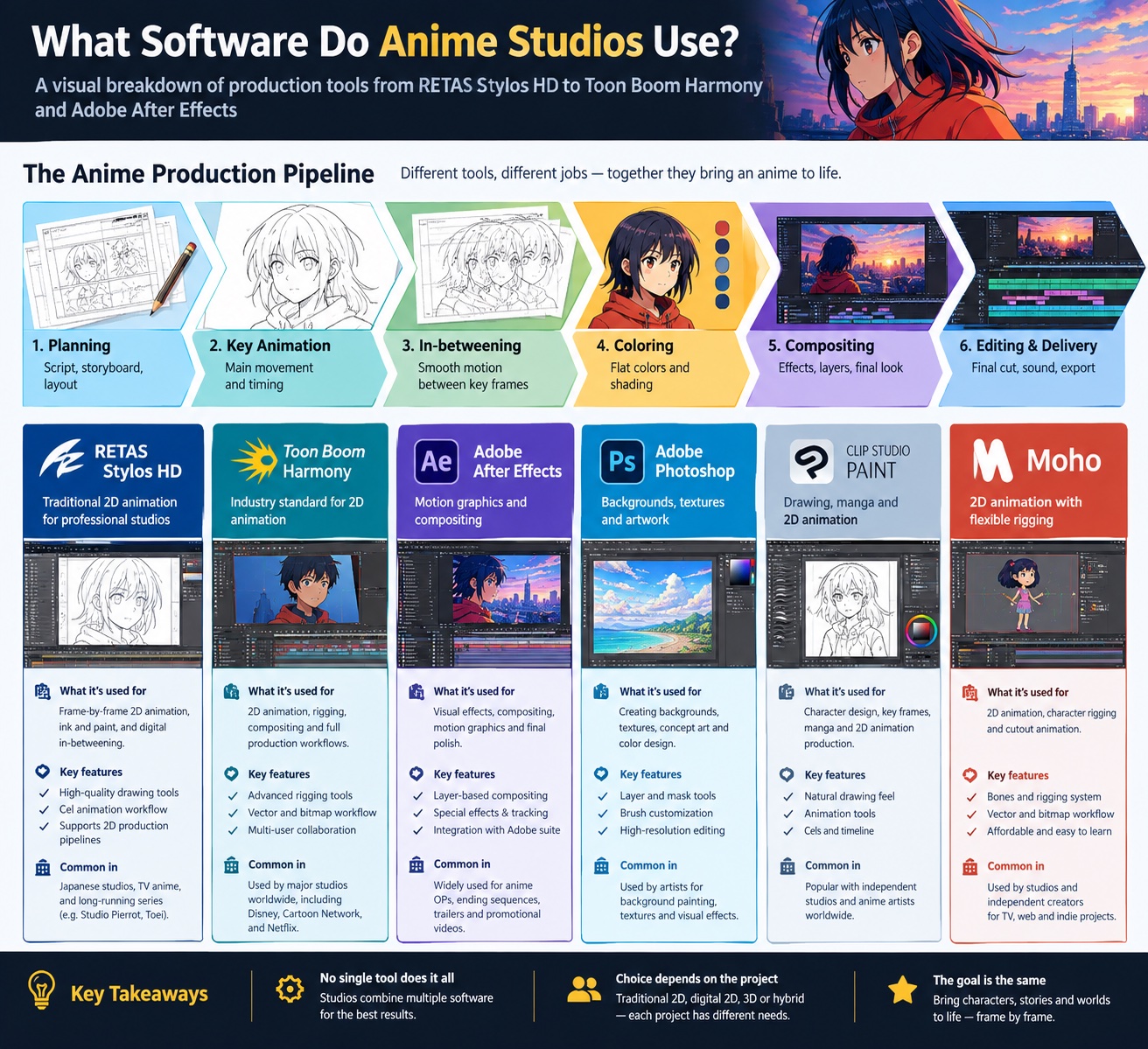
Why Answering This Is More Complicated Than It Looks
Most lists online answer the wrong question. They tell you what software you can use to make anime-style animation at home. That is a useful question for hobbyists. But it is not what professional studios actually use in production, and the two answers are almost entirely different.
Answering what software do anime studios use in a professional context requires separating three distinct categories: the tools used in Japanese studios, the tools used in Western studios producing anime-style content, and the tools used in hybrid international co-productions that have become increasingly common on streaming platforms. Each category has its own dominant tools, conventions, and workflows built over decades of production history.
There is also a hardware layer, a compositing layer, a post-production layer, and now an emerging AI tools layer to account for. Every role in the studio uses different software even on the same project. This guide covers all of it, organised by production phase so you can see exactly which tools apply at each stage of making an anime.
The single most important fact to understand upfront: the Japanese anime industry runs almost entirely on a software suite called RETAS, developed by CELSYS, which has held over 80% market share in Japan since the 1990s. If a list of anime production software does not mention RETAS, it is describing hobby tools, not professional studio infrastructure.
The 4-Phase Production Pipeline
Professional anime production follows a clear four-phase structure. Each phase uses different software managed by different specialists. Understanding this pipeline is the essential context for everything that follows.
Most production bottlenecks occur in Phase 3. The douga (in-betweening) phase is where the largest number of artists work, and where software workflow choices have the most direct impact on throughput and cost. This is why RETAS has held its position as the dominant tool for over three decades: every frame of every scene passes through its ink-and-paint components multiple times before compositing begins.
Phase 1: Pre-Production Software
Pre-production in anime covers everything from script development through to locked storyboards and finalised character and setting design sheets. The tools used here are more varied than in any other phase, because different roles pull toward different preferences and many pre-production tasks still involve paper at Japanese studios.
Storyboarding and Animatics
Storyboard artists in Japan (ekonte artists) have historically worked on paper, with physical boards scanned and assembled digitally for timing and animatic review. Increasingly, digital storyboarding tools are replacing paper at the boards stage. The most common digital tools at this stage are:
- Clip Studio Paint EX: Widely used in both storyboarding and character design at Japanese studios with manga-adjacent workflows. Toei Animation, OLM Asia, and Yostar Pictures all use Clip Studio Paint in active production. Its timeline tools and brush engine make it a natural fit for studios already using it for illustration and manga work.
- TVPaint Animation: The Professional Edition includes a dedicated storyboard mode with full scene management and export tools. Widely used at European and Western productions for both storyboarding and animatics before moving into full animation.
- Toon Boom Storyboard Pro: The industry standard for Western animation pre-production, used alongside Toon Boom Harmony in studios running a fully integrated Toon Boom pipeline from concept through to compositing.
- Adobe Photoshop: Still used extensively for concept art, character design sheets (settei), background rough sketches, and colour script development. Its brush versatility makes it a pre-production staple even at studios using other tools for actual animation production.
Character Design and Model Sheets
Character designers (kyara dezainaa) produce the settei, the official character model sheets that govern how every character looks from every angle at every scale throughout the entire production. These documents are produced in either Clip Studio Paint or Adobe Photoshop in most Japanese productions and distributed to all animators as locked reference PDFs.
The quality and completeness of the settei has a direct impact on character consistency across a full series. Poor or incomplete model sheets result in off-model frames that require expensive correction. Experienced character designers at larger studios spend significant time on settei before a single production frame is animated, producing not just standard poses but detailed facial expression sheets, hand gesture sheets, and costume reference sheets for every major character.
Background art (bijutsu) is handled primarily in Adobe Photoshop, with reference to physical gouache and watercolour painting in Japanese studios that maintain that traditional aesthetic. Studios like Kyoto Animation are known for their painstaking background quality, produced by dedicated background departments using digital painting tools to match the warmth of traditional media.
Phase 2: Key Animation Software
of the Japanese anime industry runs on RETAS, developed by CELSYS and in continuous professional use since 1993. Toei Animation, Sunrise, and over 100 production companies use it as their core production tool across key animation, in-betweening, and compositing.
Knowing the key animation phase means understanding RETAS first. RETAS (Revolutionary Engineering Total Animation System) is not a single application but a suite of four specialised tools that together cover the complete 2D animation production workflow from line art drawing through to final cel compositing.
The RETAS Suite: All Four Components
The dominance of RETAS is a product of its deep integration into Japanese studio workflows built up over more than 30 years. The entire production pipeline structure, from how files are named to how frames are numbered, tracked, and handed between artists, has been organised around RETAS conventions. Switching to a different core tool would mean rebuilding not just the software environment but the organisational infrastructure and institutional muscle memory of the entire studio.
RETAS also handles the intersection between paper and digital production particularly well. Many of Japan's most celebrated animators, including the older generation of key animators at major studios, still prefer drawing on paper. TraceMan HD allows paper-drawn genga to move into the digital pipeline without requiring those animators to change their working method.
Source: RETAS on Wikipedia documents the system's history from its 1993 launch by CELSYS through to its current position as the production standard in Japan. The Anime News Network Answerman column on production software remains one of the most detailed public accounts of how Japanese studio pipelines function in practice.
Phase 3: In-Betweening, Cleanup and Ink/Paint
This phase is the production engine of an anime series. In-betweening artists (douga-ka) fill the frames between the key animator's poses to create the illusion of smooth movement. Cleanup artists (dougaman) then refine the rough key animation lines to match the character's model sheet before the frame is passed to ink-and-paint. Together, these roles account for the majority of the labour hours in any anime production, often representing 60 to 70 percent of total artist time on a series.
In Japanese studios, all three tasks run through the RETAS suite. Stylos HD handles cleanup drawing, TraceMan HD handles scanning of any paper in-betweens, and PaintMan HD handles the painting of every approved frame. This is why RETAS market share in Japan looks so high: every frame of every scene passes through multiple components of the suite before compositing begins.
TVPaint as a Frame-by-Frame Alternative
TVPaint Animation is the primary alternative tool for studios wanting frame-by-frame traditional animation outside the RETAS ecosystem. It is a French application with roots going back to 1991, and it handles the full production pipeline from storyboard through animation, ink, and paint to compositing within a single application environment.
WIT Studio, the studio behind the first three seasons of Attack on Titan and Vinland Saga, uses TVPaint in its production pipeline. Cartoon Saloon used it on Wolfwalkers. Studio La Cachette used it on Primal. TVPaint's bitmap-based drawing system is preferred by animators who want an experience closer to traditional paper animation, with highly customisable brushes, a powerful light table function, and precise line control that raster tools provide over vector alternatives.
TVPaint is also used extensively in animation education programs and smaller independent studios because its pipeline, while powerful, is less locked into enterprise-scale organisational requirements than RETAS. An independent creator making an anime short can run the entire production workflow in TVPaint on a single machine.
Phase 4: Compositing and Post-Production Software
Compositing is where backgrounds, animated cel layers, effects, and any 3D elements are combined into the final picture. It is also where the visual identity of a studio is most distinctly expressed: through colour temperature choices, atmospheric haze, lens effects, and the specific way light interacts with character surfaces and backgrounds. The difference in visual quality between studios is often most visible at the compositing stage.
Western and Hybrid Studio Tools
The picture shifts significantly for Western studios producing anime-style content, North American streaming co-productions, and independent anime projects from creators outside Japan. In this context, RETAS is largely absent and two other tools dominate the professional pipeline: Toon Boom Harmony and TVPaint Animation.
Toon Boom Harmony
Toon Boom Harmony is the professional standard for TV animation in North America and the dominant tool in Western anime-style productions. It supports both rigged character animation using cut-out puppet systems and frame-by-frame hand-drawn animation, giving studios the flexibility to mix approaches within the same production or across different projects.
Toon Boom Harmony's network compositing system is significantly more powerful than CoreRETAS, allowing complex multi-layer effects, per-scene lighting nodes, and fully integrated particle systems without requiring a separate compositing application for most shots. Studios running a full Toon Boom Harmony pipeline can complete animation and compositing within a single software environment.
Magic Motion Studio is a Toon Boom Harmony studio, using it as the core production tool in anime-style productions for brands, independent creators, and commercial projects. Its full pipeline integration from layout and drawing through compositing and scene assembly makes it the most capable single-application professional solution available outside the RETAS ecosystem.
Clip Studio Paint EX
Clip Studio Paint EX has established itself as the most broadly adopted drawing tool across both professional and semi-professional anime production globally. It began as a manga illustration tool and evolved into a full animation platform with timeline controls, onion-skinning, frame export, and dedicated animation file management.
Its biggest advantage is an intuitive drawing experience that closely matches traditional media, combined with an extensive library of community-created brush assets that allow artists to replicate specific traditional looks. In Japan, Toei Animation and OLM Asia use it in active production. Among independent creators and smaller studios globally, it is the most commonly used tool for anime-style frame-by-frame animation at a non-enterprise scale.
Clip Studio Paint EX is also used alongside RETAS or Toon Boom at larger studios, particularly for character design reference work, settei production, and pre-production illustration. Its adoption is growing fastest in studios that straddle manga illustration and animation production, particularly those working on multimedia projects spanning comics and animation simultaneously.
Looking for a Studio Running a Professional Pipeline?
Magic Motion Studio produces anime-style animation using Toon Boom Harmony, After Effects, and the same production standards as broadcast-level studios.
The Hardware Layer
Software tools only produce results when paired with hardware that matches the demands of professional frame-by-frame production. In anime studios, the drawing hardware is almost as standardised as the software itself. The Wacom Cintiq series has been the professional standard for well over a decade, and its position has not been meaningfully challenged by any alternative.
The reason the Wacom Cintiq family holds its position so firmly is the specific combination of pen tip feel, pressure curve accuracy, and display colour fidelity it provides. A key animator may draw several thousand individual lines per working day, and the tactile experience of drawing on a Cintiq Pro 24 closely matches the experience of drawing on paper with a mechanical pencil, which is why animators who trained on paper accept it as a natural transition.
Some studios, particularly those with in-betweening teams operating in Southeast Asia and South Korea under Japanese production supervision, also use Wacom Intuos Pro tablets without built-in displays, paired with external reference monitors. The significant cost difference makes equipping large douga teams considerably more economical. Experienced in-betweening artists adapt to the coordinate-mapping requirement of a non-display tablet, particularly when drawing reference lines they know by muscle memory rather than novel forms.
Audio production uses Pro Tools or Logic Pro as the standard DAW for both voice recording, sound effects editing, and final music mix. Sound directors (onkyou kantoku) working across Japanese productions predominantly use Pro Tools, which remains the broadcast standard for audio post-production at delivery facilities worldwide.
Role-by-Role Software Map
The tools in use depend entirely on which role you are asking about. Different specialists use different software even within the same studio on the same project. The table below maps each production role to its primary and alternative tools.
| Role | Primary Software | Alternative Tools | Drawing Hardware |
|---|---|---|---|
| DirectorKantoku | Clip Studio Paint, paper boards | Storyboard Pro, TVPaint | Cintiq / paper and scanner |
| Character DesignerKyara Dezainaa | Clip Studio Paint EX, Photoshop | TVPaint, RETAS Stylos HD | Cintiq Pro 24 |
| Key AnimatorGenga-ka | RETAS Stylos HD (Japan) / Toon Boom Harmony (West) | TVPaint, Clip Studio Paint | Cintiq Pro 24 |
| In-Between AnimatorDouga-ka | RETAS Stylos HD, TraceMan HD | Toon Boom Harmony | Cintiq 22 / Intuos Pro |
| Ink and Paint ArtistShiage | RETAS PaintMan HD | TVPaint, Toon Boom Harmony | Cintiq 22 / Intuos Pro |
| Background ArtistBijutsukan | Adobe Photoshop | Clip Studio Paint, Procreate (concepts) | Cintiq Pro 24 |
| Compositing ArtistSougou-ka | Adobe After Effects, CoreRETAS | Toon Boom Harmony (network), Maya | Dual-monitor workstation |
| 3D CGI Artist | Autodesk Maya, 3ds Max | Blender | GPU workstation |
| Sound DirectorOnkyou Kantoku | Pro Tools, Logic Pro | Reaper, Adobe Audition | DAW workstation and monitors |
| EditorHenshuusha | Adobe Premiere Pro | Avid Media Composer | Editing workstation |
Japan vs Western Studio Workflows: A Direct Comparison
The divide between Japanese and Western anime-style production workflows is one of the sharpest in any creative industry. Understanding what software do anime studios use in Japan versus the West reflects two entirely different production philosophies, optimised for different output scales, different labour models, and different aesthetic priorities.
| Production Aspect | Japanese Studio Pipeline | Western / Hybrid Pipeline |
|---|---|---|
| Core Drawing Tool | RETAS Stylos HD | Toon Boom Harmony or TVPaint |
| Ink and Paint | RETAS PaintMan HD | Built into Toon Boom or TVPaint |
| Compositing | CoreRETAS plus After Effects | Toon Boom network or After Effects |
| Pre-Production | Paper boards plus Clip Studio Paint | Storyboard Pro plus Clip Studio Paint |
| Character Design | Clip Studio Paint EX, Photoshop | Clip Studio Paint EX, Photoshop |
| Paper Workflow | Hybrid (paper key frames common) | Fully digital in most studios |
| 3D Integration | Maya with proprietary plug-ins | Maya, Blender, or Cinema 4D |
| Background Art | Photoshop, gouache-reference painting | Photoshop, Clip Studio Paint |
| Pipeline Flexibility | Highly standardised around RETAS | More varied tool combinations |
| Typical Output Scale | 12 to 24 episodes per cour, weekly delivery | Shorter series or film, flexible schedule |
AI and Emerging Tools in 2026
The anime production industry is beginning to integrate AI-assisted tools at specific points in the pipeline, with the most significant current adoption happening in the in-betweening phase. AI in-betweening tools are changing what software do anime studios use for generating the frames between key poses, reducing the volume of manual douga work required per scene without replacing the creative judgment of the human artists overseeing the process.
The consensus across professional anime studios is that AI tools are useful labour-assistance tools at specific high-volume repetitive stages, not replacements for the skilled craft work and creative judgment that define the medium. The most likely near-term normalisation is douga teams working alongside AI in-betweening tools that reduce per-episode frame generation time while keeping human artists in the quality control loop.
Frequently Asked Questions
What software do anime studios use for in-betweening?
Japanese studios predominantly use RETAS PaintMan HD and CoreRETAS for the in-betweening and cleanup phases. Western studios doing anime-style work often use Toon Boom Harmony or TVPaint Animation for the same purpose. The in-betweening role (douga) is the most labour-intensive phase and is where software choice has the biggest impact on production throughput.
Do professional anime studios use Clip Studio Paint?
Yes. Clip Studio Paint EX is actively used by several major studios including Toei Animation, OLM Asia for the Pokemon anime, and Yostar Pictures. It is gaining adoption particularly for character design, key animation reference sheets, and studios blending manga and animation workflows. It is more common in hybrid production pipelines than as the sole animation tool for full series production.
Is Toon Boom Harmony used in Japan?
Toon Boom Harmony is more widely used in North American and European studios producing anime-style content than in Japan itself. Japanese studios built their workflows around RETAS decades ago and have deeply integrated it into their pipelines. Western anime-style productions, co-productions, and studios producing shows specifically for international streaming platforms more commonly use Toon Boom Harmony.
What 3D software do anime studios use?
Autodesk Maya and 3ds Max are the primary 3D tools used when anime incorporates CGI elements. Ufotable built custom Python-scripted Maya pipelines for productions like Demon Slayer, seamlessly blending hand-drawn 2D character animation with 3D environments and effects. Blender is increasingly used by independent anime projects and smaller studios for its zero licence cost and active development community.
What hardware do anime studios use?
The Wacom Cintiq series is the professional standard across almost every anime studio. Key animators and character designers typically use the Cintiq Pro 24 or Cintiq 22, which allow drawing directly on a high-resolution display. Some studios also use iPad Pro with Apple Pencil for storyboarding and reference work, though Wacom Cintiq remains the production drawing standard for all frame work.
What software do anime studios use for compositing?
Adobe After Effects is the compositing standard across most mid-to-large anime studios. RETAS CoreRETAS handles basic cel compositing within the RETAS pipeline. Studios with heavy CGI integration, like Ufotable, build custom compositing pipelines around Autodesk Maya. DaVinci Resolve is increasingly used for colour grading and final output preparation at the finishing stage before streaming or broadcast delivery.
What This Means If You Are Commissioning Anime Production
The tools a studio runs at each production phase have a direct practical consequence when briefing them on a project. They reveal workflow depth, production capacity, and the ability to deliver consistent quality across a multi-scene project.
A studio running Toon Boom Harmony as its core animation tool, combined with After Effects for compositing and Clip Studio Paint for character design, is operating a production-grade pipeline comparable to international broadcast standards. Studios using only consumer-tier applications, or tools not designed for series production, will show that in their output consistency and their ability to manage multi-asset deliveries on schedule.
When you commission anime animation, asking about the production pipeline by phase is a legitimate and useful part of the scoping process. A studio that can describe what it uses for key animation, ink and paint, compositing, and audio separately is a studio that has built genuine production infrastructure. A studio that answers the question with a single tool name has likely not separated those phases into a structured workflow.
For a broader view of how the production process works from concept through delivery, see our guide on what anime animation is and how it differs from other animation forms. If you are working toward your own anime project, the guide on how to make an anime pilot walks through every production phase in detail, including the specific role each software tool plays in that process. For communicating your creative vision clearly to a production team, see how to brief an anime studio.
For an understanding of the frame-by-frame technique that underpins most of the software discussed on this page, see our guide on what frame-by-frame animation is and why studios choose it over rigged animation approaches. And if you are evaluating studios by location as well as capability, our overview of the best anime animation studios in the USA covers how different studios position their pipeline and output quality.
Work With a Studio That Runs a Production-Grade Pipeline
Magic Motion Studio uses Toon Boom Harmony, After Effects, and the same tools and standards as professional broadcast studios to deliver anime-style animation for brands and independent creators.
See Our Anime Animation Studio